Component Count by Regulation
Published: 2026-06-25 Revised: 2026-06-25
What this report does
Shows the active component population for every unit under the selected regulation, broken down by component type, subtype, M21 frequency, AVO frequency, and boolean property flags (DTM, fDTM, UTM, CVS, NDE). Each row represents a unique combination of these attributes within a unit, with a count of how many components match that combination.
The component population is reported as of the selected Effective Date. Use this report to get a regulation-scoped snapshot of your component composition at a point in time. This report is available directly on the Reports tab.
When to use it
- Reviewing the active component breakdown for a specific regulation at a specific date.
- Confirming how many components under a regulation have DTM, UTM, CVS, or NDE flags set.
- Getting regulation-filtered component counts by type and frequency combination.
Parameters
| Parameter | Description | Required | How it filters |
|---|---|---|---|
| Regulation | The regulation to report on | Yes | Only components mapped to this regulation appear |
| Unit Type | Whether to filter by Process Unit or Location Unit | Yes | Determines which unit list populates |
| Effective Date | The point-in-time date for the component snapshot | Yes | Component profiles, frequencies, and flags are evaluated as of this date |
No Units parameter. All units of the selected type are always shown. To focus on a specific unit, filter the output in Excel after export.
Regulation-scoped. Only components mapped to the selected regulation appear. For a full unit census regardless of regulation assignment, use Component Count by Unit.
Columns
| Column | What it shows | Format / Notes |
|---|---|---|
| Unit | The unit name | Text; each unit section groups its rows |
| Type | Component type (level 1) | Text; e.g., "Valve", "Connector", "Agitator" |
| SubType | Component type (level 2) | Text; shows "(Multiple)" when the grouping spans more than one subtype |
| M21Freq | M21 inspection frequency code for this regulation | Text; e.g., "M", "Q", "A", "MMQ (Monthly/Monthly/Quarterly — initial monitoring program)", "EX"; blank if none assigned |
| AVOFreq | AVO inspection frequency code for this regulation | Text; blank if none assigned |
| DTM | Whether the components in this row are flagged Difficult to Monitor | YES or NO |
| f DTM | Whether the DTM frequency override has been cancelled | YES or NO; "f DTM" means DTM = Yes but the frequency adjustment is cancelled |
| UTM | Whether the components in this row are flagged Unsafe to Monitor | YES or NO |
| CVS | Whether the components in this row are flagged Closed Vent System | YES or NO |
| NDE | Whether the components in this row are flagged No Detectable Emissions | YES or NO |
| Tag Count | Number of components matching the row's attribute combination | Integer |
A grand total row appears at the bottom showing the total component count across all units.
What's included and excluded
Included:
- Active (non-deactivated) components mapped to the selected regulation, as of the Effective Date.
- All units of the selected type.
Excluded:
- Deactivated components.
- Components not mapped to the selected regulation.
- Rejected components.
How key values are calculated
Rows and grouping
Each row represents a unique combination of Unit + Type + M21Freq + AVOFreq + DTM + fDTM + UTM + CVS + NDE. When components within a type share more than one subtype, the SubType column shows "(Multiple)."
Effective Date snapshot
All attribute lookups — profile (active/deactivated), frequencies, and boolean flags — use the Effective Date. A component that was active on the Effective Date appears; one that was deactivated before the Effective Date does not.
M21 and AVO frequencies
Frequencies are looked up for the selected regulation specifically. A component assigned a different frequency under a different regulation will reflect the frequency applicable under the regulation you selected.
f DTM
A component shows "f DTM = YES" when the DTM property is set to Yes AND the Cancel DTM Frequency override is also active. This means the component is marked as Difficult to Monitor but its normal monitoring schedule has not been adjusted — the DTM property does not affect its frequency for this component.
fDTM components still carry their DTM designation — including the physical access difficulty and associated DTM Hows and Why — but they are toured with other standard-frequency components rather than on the annual DTM schedule. The f DTM column in this report identifies these components so they remain visible to technicians and administrators.
Tips and common questions
- "How is this different from Component Count by Unit?" This report only counts components that are mapped to the selected regulation; Component Count by Unit includes all active components regardless of regulation assignment. Use this report when you need a count that reflects your regulated population; use the other for a full unit census.
- "SubType shows '(Multiple)' — why?" The row spans more than one subtype (for example, both Gate and Ball valves with the same frequency and property combination). To see subtypes individually, filter or group in Excel after export.
- "A component I know is active is missing." Confirm the component is mapped to the selected regulation and is not deactivated as of the Effective Date. Also verify the component is not marked as Rejected.
- "Tag Count is much lower than expected." The count is segmented by every attribute combination. Many rows may contribute to the total for a given type — add up all rows with the same Type to get the full count for that type.
- "There is no Units filter — how do I see just one unit?" Export to Excel and filter the Unit column.
- "My report looks different from what this article describes." A customer-specific variant of this report exists for certain facilities. If your version includes additional columns or different groupings, your facility may be using a customized version. Contact your Chateau administrator to confirm which version is configured for your facility.
Sample output
Report run for Example Facility, Regulation: Practice, Unit Type: Location Unit, Effective Date: 7/1/2024.
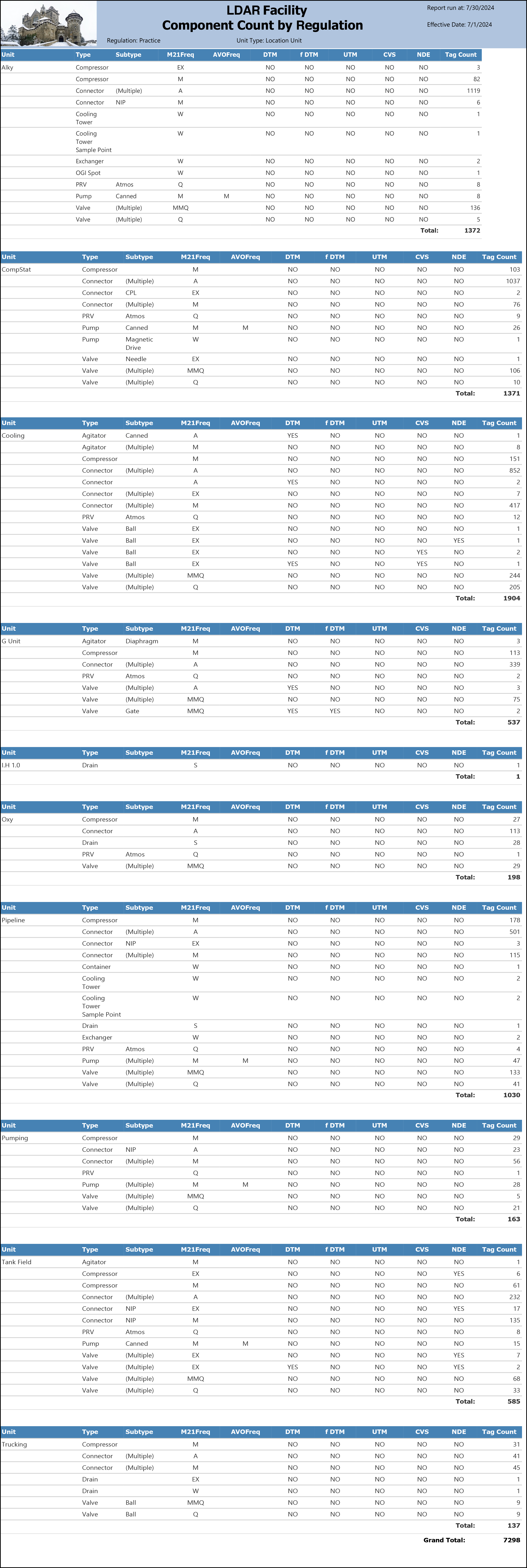
What the rows illustrate:
- Alky — large mixed population: The largest single unit section (Total: 1372) with the widest variety of component types, including Compressor, Connector, Cooling Tower, Cooling Tower Sample Point, Exchanger, OGI Spot, PRV, Pump, and Valve rows. The Connector (Multiple, A) row at 1119 is the single largest row in the report.
- Alky Connector (NIP, M): A separate connector row with Subtype = NIP and Monthly frequency distinct from the Annual (Multiple) connector row, illustrating how subtypes that differ from the majority appear as their own row rather than rolling into "(Multiple)."
- Alky Valve (Multiple, MMQ): 136 valves in the MMQ program — the largest valve row in the Alky unit.
- CompStat — Pump (Canned, M/M): The only row in the report with both M21Freq and AVOFreq populated (M and M respectively), illustrating a component type with dual inspection program assignments.
- Cooling — Connector (Multiple, A, DTM = YES): 2 connectors with DTM = YES and Annual frequency, appearing as a separate row from the non-DTM Annual connectors (852) in the same unit. DTM flag differences always produce separate rows.
- Cooling — Valve (Ball, EX, NDE = YES): 1 valve flagged NDE = YES with Exempt M21 frequency, illustrating that NDE-flagged components can carry an EX frequency under the selected regulation.
- Cooling — Valve (Ball, EX, UTM = YES): 2 valves flagged UTM = YES with Exempt frequency, appearing separately from the non-UTM Exempt Ball valve row.
- G Unit — Valve (Multiple, MMQ, DTM = YES, f DTM = YES): 2 valves where DTM = YES and f DTM = YES simultaneously — the DTM property is set but the frequency override is cancelled. These appear as their own row distinct from the DTM = YES / f DTM = NO row (75 valves) in the same unit.
- LU 1.0 — Drain (S): A single-component unit with one Drain at Semi-Annual frequency; Total = 1. Illustrates that units with minimal regulated populations still appear as their own section.
- Tank Field — Connector (NIP, EX, CVS = YES): 15 connectors flagged CVS = YES with Exempt frequency, appearing separately from the non-CVS NIP connector row (135). CVS flag differences produce separate rows just as DTM and UTM do.
- Trucking — Valve (Ball, MMQ and Q): Two separate Ball valve rows with different M21 frequencies (MMQ = 9, Q = 9), illustrating that frequency differences within the same subtype always produce separate rows.
- Grand Total: 7298 — the total active component count across all units mapped to the Practice regulation as of 7/1/2024.
Output format
One row per unique attribute combination per unit. Includes a Grand Total at the bottom. Suitable for on-screen viewing, PDF, and Excel export.
Related reports
- Component Count by Unit — same structure without a regulation filter; includes all active components regardless of regulation assignment.
- DTM Counts — focused view of DTM component counts and the 3% threshold per unit and type, filtered by regulation and physical state.