Comparative Monitoring
Published: 2026-06-25 Revised: 2026-06-25
What this report does
Compares M21 (EPA Method 21 — instrument-based leak detection) inspection metrics between two technicians on selected dates, side by side per component. For each component both technicians inspected, the report shows three measurements:
- PPM — the net reading (detector peak minus background)
- JTime (Sec) — "Jump Time": the time elapsed between the end of the previous inspection and the start of this one, in seconds
- Total Ins Time — total inspection time (sample duration plus dwell duration), in seconds
You can set variance thresholds for each metric and limit the comparison to the first N components the lead technician inspected that day. A "Show Just Variances" option filters the output to only rows where at least one metric differs beyond its threshold.
Use this report to identify training opportunities, verify data quality, and compare inspection pacing between technicians. This report is available directly on the Reports tab.
When to use it
- Investigating whether two technicians are producing consistent PPM readings on the same equipment.
- Reviewing inspection pacing differences (JTime and Total Inspection Time) between a trainee and an experienced technician.
- Spot-checking a selected set of components from the start of a shift for quality review.
Parameters
| Parameter | Description | Required | How it filters |
|---|---|---|---|
| Tech 1 | First technician to compare | Yes | Only M21 inspections by this technician on Tech 1 Date are included |
| Tech 2 | Second technician to compare | Yes | Only M21 inspections by this technician on Tech 2 Date are included |
| Tech 1 Date | Date of Tech 1's inspections | Yes | Inspections on this calendar date for Tech 1 |
| Tech 2 Date | Date of Tech 2's inspections | Yes | Inspections on this calendar date for Tech 2 |
| PPM Variance | Maximum acceptable PPM difference (%) | Yes | Rows exceeding this threshold are flagged as variances |
| Time between Monitoring Events (Seconds) | Maximum acceptable JTime difference (seconds) | Yes | Rows exceeding this threshold are flagged as variances |
| Total Insp Time Variance | Maximum acceptable Total Ins Time difference (seconds) | Yes | Rows exceeding this threshold are flagged as variances |
| Look at how many components from start? | How many components to include, counting from Tech 1's first inspection | Yes | Limits the comparison to the first N components in Tech 1's inspection order |
| Show Just Variances | Show only rows where at least one metric differs beyond its threshold | Yes | When set to Yes, rows with no variances are hidden |
Columns
| Column | What it shows |
|---|---|
| Tag | Component tag |
| Tech 1 PPM | Tech 1's net M21 reading (PPM) |
| Tech 1 JTime (Sec) | Seconds between the end of Tech 1's prior inspection and the start of this one |
| Tech 1 Total Ins Time | Tech 1's total inspection time (seconds) |
| Tech 2 PPM | Tech 2's net M21 reading (PPM) |
| Tech 2 JTime (Sec) | Seconds between the end of Tech 2's prior inspection and the start of this one |
| Tech 2 Total Ins Time | Tech 2's total inspection time (seconds) |
When both technicians produced the same value for a metric, that cell displays n/a to draw attention to where they differ rather than where they agree.
What's included and excluded
Included:
- M21 inspections only (not OGI or AVO).
- The earliest inspection per component per day, per technician (if a technician revisited a component on the same day, only the first visit is used).
- Components limited to the first N inspected by Tech 1 on Tech 1 Date.
Excluded:
- OGI and AVO inspections.
- Non-M21 inspection types.
- Components inspected after position N in Tech 1's inspection order.
- When Show Just Variances = Yes: rows where no metric differs beyond its threshold.
How key values are calculated
PPM
PPM = Maximum detector reading − Background reading
The net reading for the inspection, removing the background concentration.
JTime (Jump Time)
JTime = Start time of this inspection − End time of the previous inspection
Measures the time the technician spent moving from one component to the next. The first inspection of the day has no prior inspection to compare against and shows n/a for both technicians.
Total Ins Time
Total Ins Time = Sample Duration + Dwell Duration (in seconds)
The combined time the instrument spent sampling and dwelling at the component.
Variance thresholds
A row is flagged as a variance (and shown when Show Just Variances = Yes) if any of the following is true:
- |Tech1 PPM − Tech2 PPM| ÷ larger of the two > PPM Variance threshold (%)
- |Tech1 JTime − Tech2 JTime| > Time between Monitoring Events threshold (seconds)
- |Tech1 Total Ins Time − Tech2 Total Ins Time| > Total Insp Time Variance threshold (seconds)
Tips and common questions
- "A component shows for Tech 1 but not Tech 2 (or vice versa)." The report uses a full outer join — if a technician did not inspect a component on their selected date, that technician's columns show blank for that row.
- "JTime shows n/a for the first row." There is no prior inspection to measure from on the first component of the day. n/a is expected for the opening row of each technician's session.
- "All values show n/a." If Show Just Variances is set to Yes and no components differ beyond the thresholds, the report will be empty. Lower the thresholds or set Show Just Variances to No to see all rows.
- "Tech 2 Date is different from Tech 1 Date — is that allowed?" Yes. The two technicians' inspection dates are set independently. This lets you compare a trainee observed on one day against an experienced technician from a different day on the same equipment.
- "The report only shows some of the components, not all." The "Look at how many components from start?" parameter limits the comparison to the first N components in Tech 1's inspection order. Increase this value to include more components.
- "The report comes back empty." Confirm that both technicians performed M21 inspections on their respective selected dates and that at least one component was inspected by both technicians. If Tech 1 and Tech 2 inspected entirely different components, the report will be empty because there are no matching component rows to compare.
- "What does 'n/a' mean in the PPM or JTime columns?" A value of 'n/a' indicates that both technicians recorded the same value for that column — the variance is zero. It is not a data entry error or a missing value. This can occur when two technicians record identical readings at the same component, or when JTime is the same because the route sequence and pacing were identical.
- "The report is missing components I expected to see for one of the technicians." The NumComponents parameter limits the comparison to the first N components from Technician 1's route. If Technician 2 inspected additional components that were not in Technician 1's first N components, those will not appear. Increase NumComponents or remove the limit to see the full comparison.
Sample output
Report run for Tech 1: Austin Regan (Tech 1 Date: 10/29/2025), Tech 2: Zizhe Chen (Tech 2 Date: 2/5/2026).
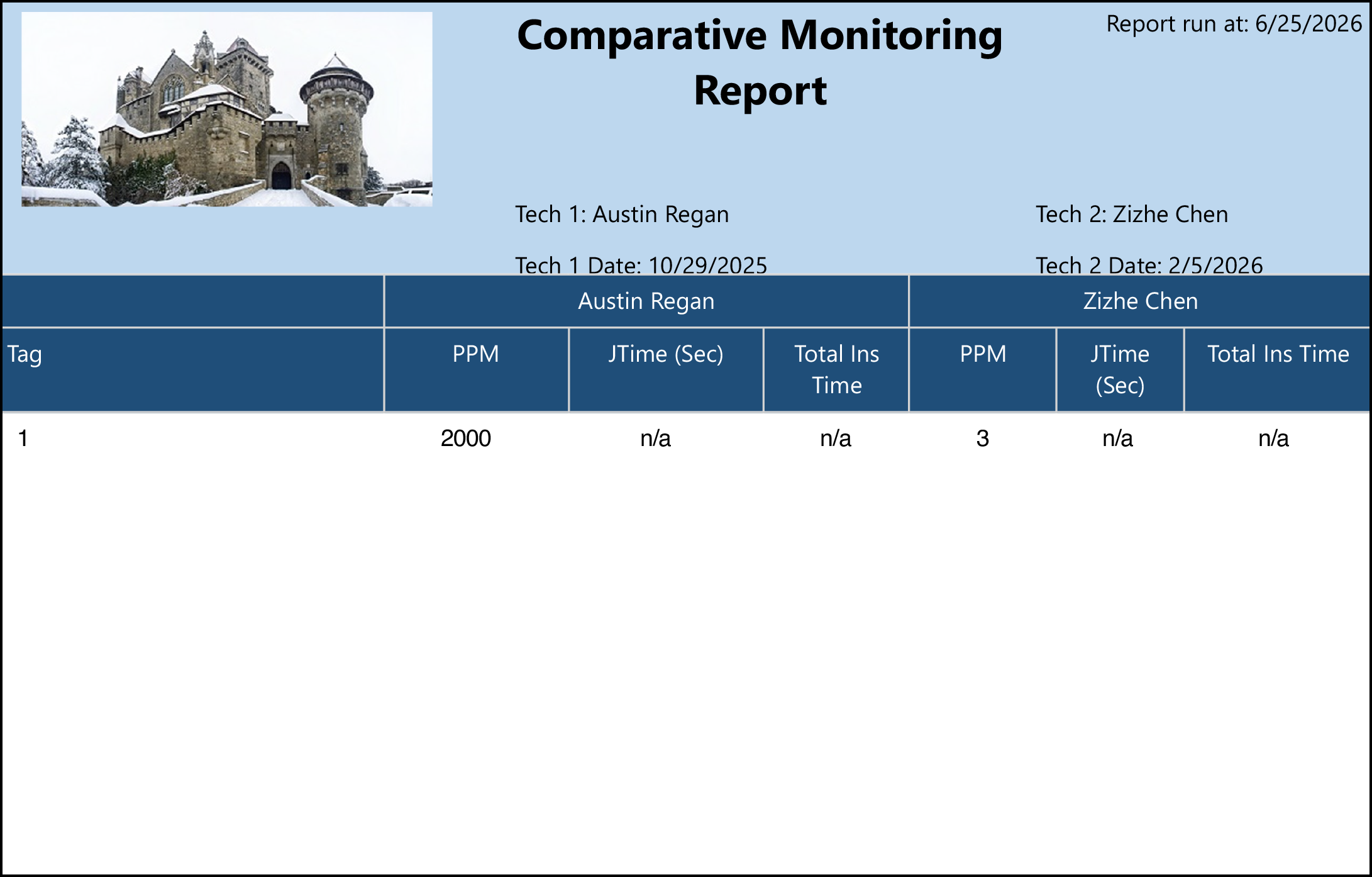
What the rows illustrate:
- Tag 1 — Tech 1 reads 2000 PPM while Tech 2 reads 3 PPM; a large PPM variance. JTime and Total Ins Time show n/a because this is the first inspection of each technician's shift (no prior inspection to calculate jump time from) — meaning the values matched or are not applicable.
Output format
One row per component. Tech 1's metrics and Tech 2's metrics appear side by side in the same row. Suitable for on-screen viewing and Excel export.
Related reports
- Tech Inspections — inspection count, first/last inspection times, and analyzer per technician per day; useful for a broader view of technician activity before drilling into a comparison.
- Inspection History — full per-component inspection detail for a unit and date range.