Activated Components
Published: 2026-06-25 Revised: 2026-06-25
What this report does
Lists every component added to the system under the selected regulation within the selected date range. Each row shows the component's tag, type, inspection frequencies, activation reason, and the people who suggested and approved the addition.
Use this report to audit new component additions, verify activation reasons, and confirm regulatory assignments for a period. For the same list with MOC Reference, equipment model, and packing columns included, use Activated Components with Equipment instead. This report is available directly on the Reports tab.
When to use it
- Reviewing all components added under a regulation during a reporting period.
- Confirming that new construction, re-tags, and new unit additions are correctly recorded.
- Identifying who suggested and approved each component addition.
Parameters
| Parameter | Description | Required | How it filters |
|---|---|---|---|
| Regulation | The regulation to report on | Yes | Only components mapped to this regulation appear |
| Unit Type | Whether to filter by Process Unit or Location Unit | Yes | Determines how units are identified in the output |
| Start Date | Beginning of the date window | Yes | Components with an add date on or after this date are included; the date is used as entered — it is not truncated to the start of the month |
| End Date | End of the date window | Yes | Components with an add date on or before this date are included; the date is expanded to the end of the day |
All units are always shown. There is no Units selection parameter — the report covers every unit of the selected type. Filter by reviewing the Unit column in the output.
Columns
| Column | What it shows | Format / Notes |
|---|---|---|
| Unit | The unit the component belongs to | Text; rows are grouped by unit, with a per-unit total count at the end of each group |
| Tag | Component tag number | Text |
| Date Added | Date the component was added to the system | Date; displayed in the component's local time zone |
| Type | Component type (level 1) | Text; e.g., "Valve", "Connector", "Pump", "PRV", "Agitator", "OGI Spot" |
| M21Freq | M21 inspection frequency code assigned to the component | Text; e.g., "M" (Monthly), "Q" (Quarterly), "A" (Annual), "MMQ", "S" (Semi-Annual), "EX" (Exempt); blank if none assigned |
| AVOFreq | AVO inspection frequency code assigned to the component | Text; same frequency code values as M21Freq; blank if none assigned |
| Active Why | The reason the component was set to active status | Text; e.g., "New Construction", "ReTag", "New Unit", "New Rule Interpretation" |
| Suggestor | Person who suggested the component activation | Text; full name |
| Approver | Person who approved the component activation | Text; full name |
What's included and excluded
Included:
- Only components mapped to the selected regulation.
- Only components whose add date falls within the selected date range.
- All component types.
- All units of the selected unit type.
Excluded:
- Components not mapped to the selected regulation.
- Components added outside the date range.
- Deactivated components (this report shows additions only; see DeActivated Components for deactivations).
How key values are calculated
Date Added
The date the component was first added to the system, displayed in the component's local time zone.
M21Freq / AVOFreq
The inspection frequency codes in effect as of the end of the report period for each inspection type. Multiple frequency codes are shown comma-separated when more than one applies.
Active Why
The profile change reason recorded when the component was activated. Common values:
| Value | Meaning |
|---|---|
| New construction | New physical equipment installed and added to inventory |
| ReTag | Existing component assigned a new tag number |
| New Unit | Component added as part of a new unit being brought into the system |
| New Rule Interpretation | A regulatory reinterpretation caused the component to be counted under this regulation |
Suggestor and Approver
For components activated via a MOC process, these are the people recorded on the MOC record. For components activated directly, they are the people recorded on the component itself.
Tips and common questions
- "Why doesn't the report let me filter to a specific unit?" The report always covers all units of the selected type. Export to Excel and filter by the Unit column to focus on a specific unit.
- "What is Active Why?" The reason the component was placed into active status. See the value table above. "ReTag" is common when an existing component is given a new tag number during a physical inventory reconciliation.
- "M21Freq or AVOFreq is blank for some components." A blank frequency means no inspection frequency has been assigned for that inspection type under this regulation. Components with Freq = EX (Exempt) are excluded from regular inspection scheduling.
- "I need to see equipment model and packing for these components." Use Activated Components with Equipment — it includes Moc Reference, Model, and Packing columns from the Component Equipment module.
- "A component I reactivated is not appearing." This report includes initial activations only — components whose activation was their first time entering an active state. A component that was previously active, then deactivated, then made active again (reactivated) does not appear here. To find reactivated components, use the Reactivated Components report.
Sample output
Report run for example facility, Regulation: Consent Decree, Unit Type: Location Unit, StartDate: 1/1/2024, EndDate: 4/29/2024.
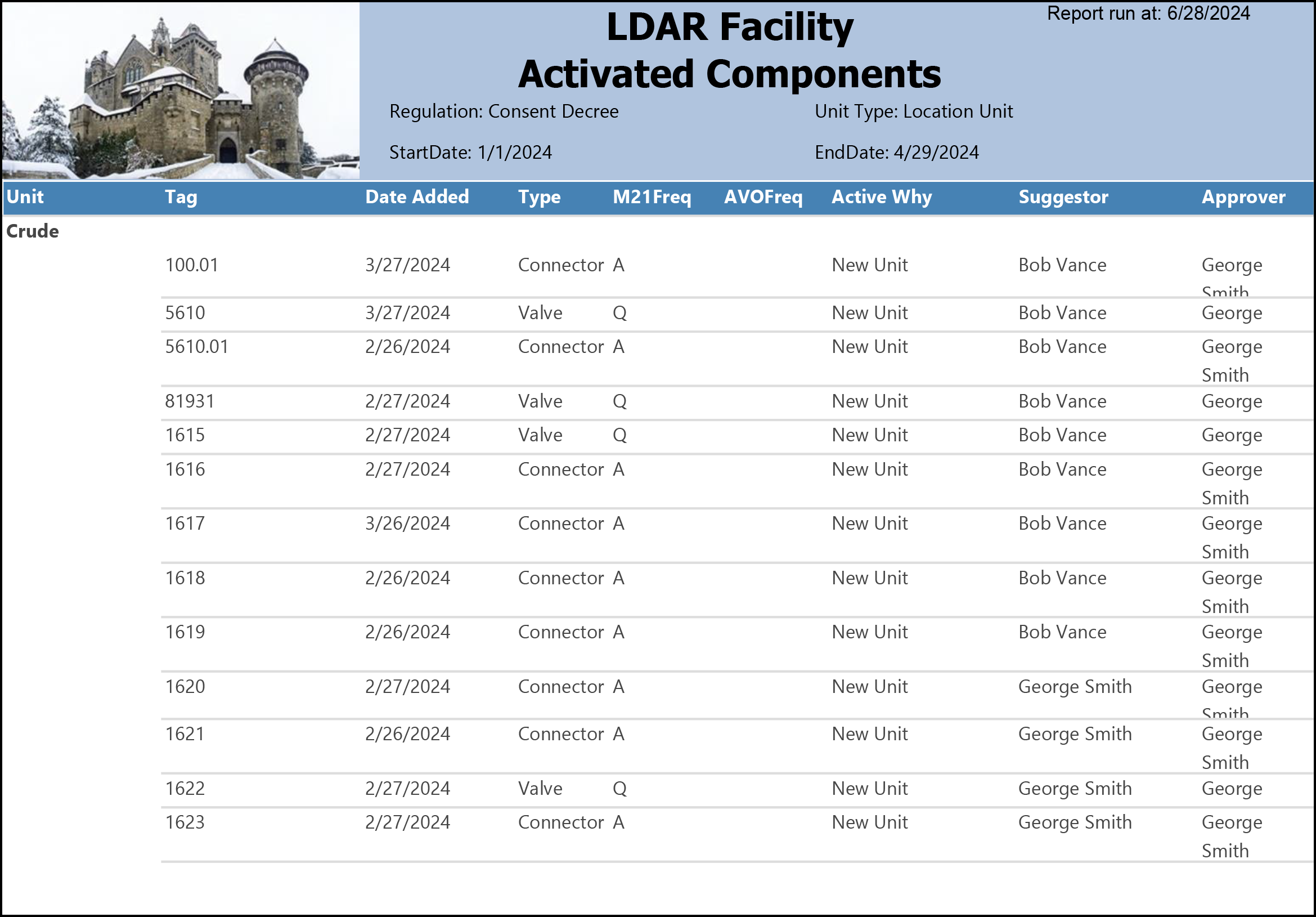
What the rows illustrate:
- All rows — Active Why = "New Unit": Every component in this sample was added under the same reason, reflecting a single new unit being brought into the system across a concentrated window of dates (2/26/2024 through 3/27/2024).
- Connectors — M21Freq = A, AVOFreq blank: All connector rows carry an Annual M21 frequency and no AVO frequency, consistent with a single regulatory assignment applying uniformly to all connectors in this unit.
- Valves — M21Freq = Q, AVOFreq blank: All valve rows (5610, 81931, 1615, 1622) carry a Quarterly M21 frequency and no AVO frequency.
- Suggestor vs. Approver: The first nine components (100.01 through 1619) were suggested by Bob Vance and approved by George Smith — different people, indicating a two-party MOC process. The final four components (1620 through 1623) were suggested and approved by George Smith — the same person on both sides.
- Tag 1617 — later add date: All other components were added in late February 2024; tag 1617 was added 3/26/2024, a month later, while still sharing the same New Unit reason and MOC parties. This illustrates that components associated with the same new unit addition can be entered on different dates.
Output format
One row per component, grouped by unit with a per-unit total. Suitable for on-screen viewing, PDF, and Excel export.
Related reports
- Activated Components with Equipment — same scope with additional Moc Reference, Model, and Packing columns; use when equipment data is needed.
- DeActivated Components — shows components removed from active status during a period.
- Reactivated Components — shows previously deactivated components that were reactivated; this report does not include reactivations.