OGI Sensitivity Check
Published: 2026-06-24 Revised: 2026-06-24
What this report does
Produces one page per OGI (Optical Gas Imaging) sensitivity check performed within the selected date range. Each page shows the environmental and equipment conditions recorded at the time of the sensitivity check — including camera information, atmospheric conditions, the reference gas used, and the technician who performed the check.
Use this report to review or export the raw sensitivity check conditions for a period, independent of the full OGI Report survey cards. This report is in the OGI folder on the Reports tab.
When to use it
- Reviewing sensitivity check conditions across all technicians and cameras for a date range.
- Verifying that environmental conditions (temperature, wind, cloud cover) were within acceptable limits at the time of each sensitivity check.
- Producing a complete log of sensitivity checks for audit or regulatory purposes.
Parameters
| Parameter | Description | Required | How it filters |
|---|---|---|---|
| Start Date | Beginning of date window | Yes | Sensitivity checks on or after this date are included |
| End Date | End of the date window | Yes | Sensitivity checks on or before this date are included |
No unit or regulation filter. This report returns all sensitivity checks in the database for the date range, regardless of which location units were surveyed.
Record fields
One page is generated per sensitivity check session. Each page shows:
| Field | What it shows |
|---|---|
| Date & Time | Date and local time the sensitivity check was performed |
| Operator | Technician who performed the sensitivity check |
| Camera Make | Manufacturer of the OGI camera used (e.g., "FLIR") |
| Camera Model | Model of the OGI camera (e.g., "GF320") |
| Camera Serial # | Serial number of the OGI camera |
| Temperature (Deg. F) | Ambient air temperature recorded at the time of the check (°F) |
| Cloud Cover | Sky/cloud conditions recorded (e.g., "Clear", "Partly Cloudy", "Overcast") |
| Wind Speed (mph) | Wind speed recorded at the time of the check (mph) |
| Pressure (in Hg) | Atmospheric pressure recorded at the time of the check (in Hg) |
| Distance | Distance in feet at which the sensitivity check was performed |
| Flow Rate | Flow rate recorded at the sensitivity check |
| Contents | Gas mixture used for the sensitivity check (e.g., "propane") |
| Cylinder Type | Reference cylinder identifier used for the sensitivity check |
What's included and excluded
Included:
- All OGI sensitivity checks with a start time falling within the selected date range.
- One page per sensitivity check, regardless of whether any inspections were performed during that session.
Excluded:
- Sensitivity checks outside the selected date range.
- No location unit or regulation filter is applied — all checks across all units appear.
How key values are calculated
Date & Time
The date and local time of the sensitivity check start. Time is expressed in the location unit's local timezone if the sensitivity check is associated with a location unit; otherwise the facility local timezone is used.
Ordering
Records are sorted chronologically by the sensitivity check start time.
Tips and common questions
- "How does this differ from the OGI Report?" The OGI Sensitivity Check report shows one page per sensitivity check with no unit or regulation filter and no summary section. The OGI Report filters sensitivity checks by location unit and regulation and adds a summary section showing leaks, repairs, and DORs. Use this report when you need a raw log of all sensitivity checks; use the OGI Report when you need unit- and regulation-scoped documentation with a summary.
- "A sensitivity check I know was performed is not showing." Confirm that the check's recorded date falls within the selected date range. Unlike the OGI Report, there is no unit-based filter that could exclude it.
- "Contents shows a gas name (e.g., 'propane') — what does that refer to?" Contents is the gas mixture recorded in the sensitivity check record. It identifies the reference gas used to verify the camera's sensitivity before beginning the survey.
- "Cylinder Type shows a long identifier string." This is the cylinder label or regulatory ID recorded on the reference cylinder used for the sensitivity check.
- "The report comes back empty." No OGI sensitivity check records were found for the selected date range. Confirm that sensitivity checks were performed and entered in Chateau during the period.
- "How do I focus the report on a specific unit or location?" The OGI Sensitivity Check report has no unit filter — it returns all sensitivity checks facility-wide for the selected date range. To focus on a specific unit or surveyor, export the report to Excel and filter by the relevant columns. Narrow the date range to limit the number of pages returned.
Sample output
Report run for Example Facility, Start Date: 6/6/2018, End Date: 6/6/2018.
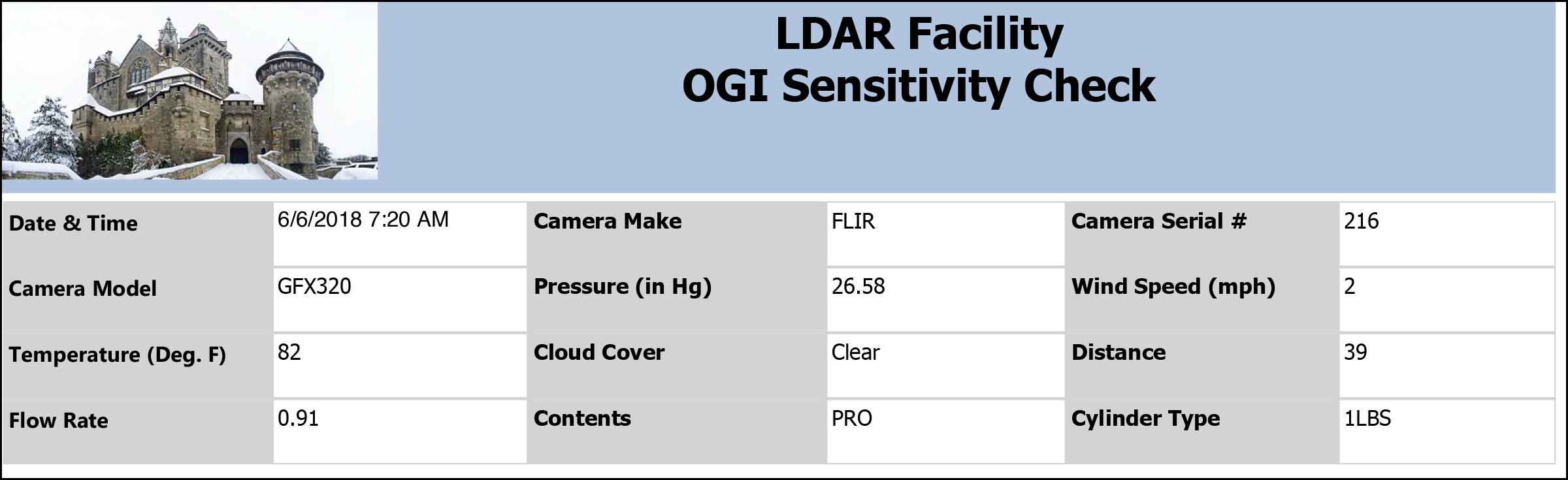
Output format
One page per sensitivity check session, displayed as a label/value grid. Ordered chronologically by check date and time. Designed for PDF output. Also available for on-screen viewing.
Related reports
- OGI Report — full OGI survey documentation with unit and regulation filters; includes a summary section with leaks, repairs, and DOR counts.