Simplified Maintenance
Published: 2026-06-25 Revised: 2026-06-25
What this report does
Lists all currently open leaks matching the selected filters, formatted for printing and handing to maintenance crews. Each leak row includes component identity, the most recent PPM reading, and the three deadline dates (first attempt, first retest, final resolution). The report includes a fill-in section below each leak row for the repair technician to complete in the field:
- Attempt Date — when the repair was performed
- Who did the Attempt — the technician's name
- Attempt Type — Standard or Advanced (checkbox)
- Attempt Method — selected from the Accepted Maintenance Methods list at the end of the report
- DirMaint? — Y/N indicating whether the repair was directed maintenance
The final pages of the report contain the Accepted Maintenance Methods list (column header: "AttemptHows") — all active repair method codes — so technicians have the valid options in front of them without needing system access.
This report always shows open leaks as of the moment the report is run. There is no date range parameter — it reflects the current open-leak state of the selected units. This report is in the Leak folder on the Reports tab.
When to use it
- Printing a work order list for repair crews before they go into the field.
- Reviewing all open leaks in a unit without filtering by date or regulation.
- Quickly assessing which open leaks have no next action assigned.
Parameters
| Parameter | Description | Required | How it filters |
|---|---|---|---|
| Unit Type | Whether to filter by Process Unit or Location Unit | Yes | Defaults to Location Unit |
| Units | One or more units to include | Yes | Only components in the selected unit(s) appear |
| Comp Type | One or more component types to include | Yes | All types are selected by default |
| Next Action | One or more next action values to include | Yes | All actions (including |
No date range, no regulation filter. The report returns all currently open leaks in the selected scope regardless of when they were opened or which regulation they belong to.
Columns
| Column | What it shows | Format / Notes |
|---|---|---|
| Unit | The unit the leaking component belongs to | Text |
| Tag | Component tag number | Text |
| Leak Def | The PPM threshold defined by the regulation for this component type — the reading that triggers a leak when exceeded | Decimal; for M21 leaks, this is the maximum allowable PPM from the matched rule; for Cooling Tower leaks, this is the CT-specific threshold; blank for AVO and OGI leaks, which have no instrument threshold |
| Leak Date | Date the leak was opened | Date; displayed as MM/DD/YY (two-digit year); component local time |
| Last PPM | Most recent PPM reading from the most recent test — Cooling Tower or M21, whichever is newer | Decimal; blank if no M21 or Cooling Tower test has been performed since the leak opened |
| Type | Component type (e.g., Valve, Pump, Connector) | Text |
| Subtype (SubT) | Component subtype | Text; blank if not assigned |
| Sub-subtype (SubSub) | Component sub-subtype | Text; blank if not assigned |
| Physical State (PhyS) | Physical state of the component | Text |
| Size (sz) | Component size | Text; the size code assigned to the component (e.g., "0.75", "1/2"); may be blank if no size is assigned or if the size code is not in a numeric format |
| Location | Location description | Text |
| Monitoring Access Method (DTM How) | How the component is physically accessed for monitoring — the method used to bring an instrument to the potential leak point | Text; e.g., "Stem", "Horn", "Packing"; blank if not assigned |
| Emission Point (EmPt) | Comma-separated list of emission points on this leak | Text; blank if no emission points recorded |
| Next Action | Current next action on the leak | Text; e.g., "Await Maint"; blank if none assigned |
| 1st Attempt By | Deadline for the first repair attempt | Date; shows today's date as a placeholder if no deadline has been calculated yet — this does not represent the actual regulatory deadline; check the leak record in Chateau to confirm |
| 1st Retest By | Deadline for the first verification inspection | Date; same today-fallback behavior as 1st Attempt By |
| Final Res By | Deadline for final resolution | Date; same today-fallback behavior as 1st Attempt By |
| Area | Area the component is in | Text; blank if not assigned |
| Work Order | Work order number on the leak | Text; blank if none |
What's included and excluded
Included:
- All currently open leaks (
DateClosed IS NULL) on components in the selected unit(s) and component type(s). - Leaks with a Next Action matching the selected Next Action filter, including leaks with no next action when
<None>is selected. - All regulations — the report is not filtered by regulation.
Excluded:
- Closed leaks of any kind.
- Leaks on components outside the selected unit(s) or type(s).
- Leaks whose Next Action does not match the filter (when
<None>is not selected, leaks without a next action are excluded).
How key values are calculated
Last PPM
The Last PPM column shows the most recent PPM reading from either a Cooling Tower test or an M21 test, whichever was performed more recently. If neither type of test has been performed since the leak opened, Last PPM is blank. If both a Cooling Tower and M21 test were performed on the same date, the M21 reading is shown.
Leak Def
Shows the CT-specific threshold for Cooling Tower leaks, the M21 threshold for M21 leaks, or blank for AVO and OGI leaks (which have no PPM threshold).
Due date fallback
All three due date columns (1st Attempt By, 1st Retest By, Final Res By) show today's date when no deadline has been calculated yet — for example, when the deadline indexes off the first repair attempt and no attempt has been recorded. Today's date in this context is a display placeholder, not a real regulatory deadline.
Emission Points
The Emission Point column lists all distinct emission point codes recorded on the leak, combined into a comma-separated list. Blank if no emission points have been recorded.
Tips and common questions
- "A component is on an active Delay of Repair (DOR) — why does it appear on this list?" The report shows all currently open leaks — it does not filter by DOR status. A component appears here because its leak is still open, not because it is on a DOR. Opening a DOR does not close the leak; the component will remain on this list until the leak itself is closed. Before dispatching a maintenance crew, cross-reference the work list against active DORs in Chateau to avoid attempting repairs that are officially deferred.
- "How is this different from Simplified Leak History?" Simplified Maintenance shows only currently open leaks and is formatted for handing to repair crews — with blank fill-in fields and a repair method reference list. Simplified Leak History shows both open and closed leaks over a date range and is designed for compliance review and Excel export.
- "A due date shows today's date — does that mean the repair is overdue?" Not necessarily. Today's date appears when the deadline has not been calculated yet (typically because it indexes off the first repair attempt and no attempt has been recorded). Check the leak record in Chateau to confirm the actual deadline.
- "
is listed in the Next Action filter — what does that mean?" Leaks that have no next action code assigned. If you want to see only those leaks, select just<None>in the Next Action parameter. If you deselect<None>, those leaks will be excluded. - "The Leak Def column is blank for some leaks." A blank Leak Def indicates an AVO or OGI leak, which is detected visually or by camera and has no PPM threshold.
- "The Last PPM column is blank." No M21 or Cooling Tower test has been performed and recorded since the leak opened. This is common for AVO/OGI leaks and for newly opened leaks that haven't had a verification inspection yet.
- "What does 'DirMaint? Y/N' mean on the fill-in form?" DirMaint stands for Directed Maintenance — a regulatory classification for whether this repair attempt was a directed maintenance action. Check with your compliance coordinator before marking the form; the answer affects how the attempt is recorded in Chateau.
- "Which Attempt Type should I check — Standard or Advanced?" Standard covers routine maintenance actions (tighten, repack, adjust). Advanced typically involves component replacement or more extensive work. Your regulation may define these differently — confirm with your compliance coordinator if you are unsure.
- "What is the 'Accepted Maintenance Methods' list at the end?" The report appends a reference table of all active repair methods under the heading "Accepted Maintenance Methods." This lets technicians select and record the correct method on the printed form without logging into Chateau. The list is generated live at report time, so it always reflects your site's current repair method configuration.
- "Why don't I see leaks that were repaired in a previous period?" This report shows only currently open leaks — components that have an active leak at the time the report is run. Leaks that were previously found and repaired (or closed for any reason) do not appear. For historical maintenance leak records, use the Full Data Leak History or Simplified Leak History report.
- "What is the DirMaint field on the printed form?" DirMaint (Direct Maintenance) is a field that records the specific maintenance action taken on the component. It is entered in Chateau when a repair attempt is logged. The printed form includes this field so technicians can document the repair method applied in the field before entering it into the system.
- "Numbers in this report don't match what I see in Simplified Leak History." Simplified Maintenance shows only currently open leaks and has no date range. Simplified Leak History shows both open and closed leaks filtered by found date. The two lists will differ whenever any leak in the date range has been closed, or when an open leak was found before the Simplified Leak History start date.
Sample output
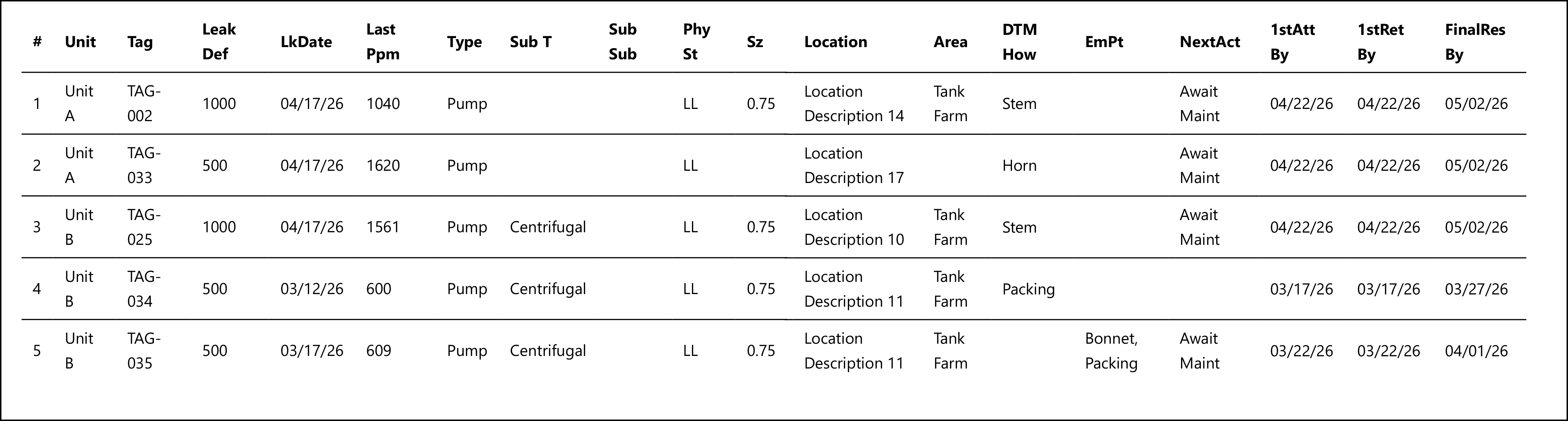
What the rows illustrate:
- Row 1 (TAG-002) — Single emission point via DTMHow (Stem); Next Action = "Await Maint"; all three deadline dates populated.
- Row 2 (TAG-033) — No Subtype, no Size, no Area, no EmPt — minimal data; DTMHow = Horn.
- Row 3 (TAG-025) — Subtype = Centrifugal; multiple same-unit leaks demonstrate how the same unit appears on multiple rows.
- Row 4 (TAG-034) — No Next Action (blank); deadlines have already passed as of the report date (3/17/26 vs. run date 5/14/26) — this component's 1st attempt deadline was overdue.
- Row 5 (TAG-035) — Multiple emission points ("Bonnet, Packing"); Next Action = "Await Maint"; deadlines also past due.
Output format
Designed for printing. Each leak row is followed by a fill-in section for the technician (attempt date, technician name, attempt type, attempt method, and directed maintenance Y/N). The final pages contain the Accepted Maintenance Methods list. Not recommended for Excel export — the form layout does not translate to a spreadsheet.
Related reports
- Simplified Leak History — open and closed leaks over a date range, with repair timeline columns; designed for compliance review and export, not maintenance handoff.
- Full Data Leak History — component-centric report with physical properties and DOR status; use for audit review rather than maintenance work orders.