Simplified Leak History
Published: 2026-06-25 Revised: 2026-06-25
What this report does
Lists all leaks found within a date range, showing each leak's key timeline dates, repair attempt activity, and any Delay of Repair on the component.
Run this report when you need a multi-regulation, multi-component-type view of leak history — who found what, when repairs were attempted, whether deadlines were met, and whether a component was placed on DOR. Because it has many columns, it is designed for export to Excel or CSV rather than on-screen reading or PDF printing. This report is in the Leak folder on the Reports tab.
When to use it
- Reviewing leak compliance across regulations before an inspection or audit — one run covers all your regulations at once.
- Tracking repair timeliness: the "Done Late" columns flag every leak where the first attempt or first retest missed its deadline.
- Looking up DOR history on specific leaks without opening each record individually.
- Reconciling open vs. closed leaks for a given period before submitting regulatory reports.
Parameters
| Parameter | Description | Required | How it filters |
|---|---|---|---|
| Start Date | Beginning of date window | Yes | Includes leaks with a found date on or after this date |
| End Date | End of the date window | Yes | Includes leaks with a found date on or before this date (through the end of that calendar day) |
| Regulations | One or more regulations to include | Yes | Only leaks tied to the selected regulation(s) appear; for M21 and OGI leaks the regulation comes from the rule that opened the leak; for AVO leaks it comes from the regulation(s) selected when the leak was entered |
| Unit Type | Whether to filter by Process Unit or Location Unit | Yes | Determines which Unit list populates below; defaults to Location Unit |
| Units | One or more units to include | Yes | Only leaks on components in the selected unit(s) appear |
| Comp Types | One or more component types to include | Yes | Only leaks on components of the selected type(s) appear |
| Leak Status | Open, Closed, or both | No | Filters which rows are shown; defaults to both Open and Closed |
Columns
| Column | What it shows | Format / Notes |
|---|---|---|
| Unit | The unit the leaking component belongs to | Text |
| Tag | Component tag number | Text |
| Type | Component type (e.g., Valve, Pump, Connector) | Text |
| Sub | Component subtype (e.g., Ball, Centrifugal, Control) | Text; blank if not assigned |
| Location | Component location description | Text |
| Leak Def | The PPM threshold defined by the regulation for this component type — the reading that triggers a leak when exceeded | Decimal; blank for AVO and OGI leaks, which are not opened by an instrument reading |
| Leak Date | Date the leak was detected | Date; component local time |
| Leak PPM | PPM reading at the time the leak was opened | Decimal; blank for AVO and OGI leaks |
| Reg | Regulation(s) the leak is tied to | Text; comma-separated if multiple |
| 1stAtt Done | Date the first repair attempt was performed | Date; blank if no attempt has been recorded; underlined if the attempt was performed after the deadline |
| 1stRet Done | Date the first verification inspection was performed after the leak opened | Date; blank if no retest has been performed; underlined if the retest was performed after the deadline |
| Latest Att | Date of the most recent repair attempt | Date |
| Latest ReT | Date of the most recent verification inspection | Date |
| Latest AttMthd | Method used in the most recent repair attempt | Text; values come from the Attempt Method picklist (e.g., "Tighten", "Tighten Seal", "Clamp"); blank if no attempt has been recorded |
| FinalRes DueDate | Deadline for final resolution of the leak | Date; if no deadline has been calculated yet (e.g., the leak is configured to set the deadline after the first repair attempt, and no attempt has been recorded), this column shows today's date as a placeholder — it does not represent a real regulatory deadline |
| FinalRes Done | Date the leak was fully resolved — either the date a passing verification inspection was confirmed, or the close date if the leak was closed another way | Date; blank if the leak is still open |
| Last PPM | PPM reading from the most recent M21 test performed while the leak was open | Decimal; blank for AVO/OGI leaks or if no M21 retest has been performed |
| Leak Status | Whether the leak is currently open or closed | "Open" or "Closed" |
| Close Why | Why the leak was closed | Text; blank if open. Common values: Pass = a verification inspection confirmed the leak was repaired; DOR = the component was placed on a Delay of Repair; Deactivated = the component was taken out of service; Database Conversion = the leak was carried over from a previous system and closed automatically during migration |
| Work Order | Work order number associated with the leak | Text; blank if none |
| DOR Date Approved | Date the Delay of Repair (DOR) was approved | Date; blank if the component was not placed on DOR |
| DOR Reason | Reason the DOR was filed | Text; shows the full reason (e.g., "Emissions from repair greater than emissions from delay"); blank if no DOR |
| DOR Closing Date | Date the DOR was closed | Date; blank if DOR is still open or no DOR |
| DOR Estimated Repair Date | Estimated repair date filed with the DOR | Date; blank if no DOR |
What's included and excluded
Included:
- Leaks with a found date (leak open date) that falls within the selected Start Date / End Date window, inclusive of the end date's full day.
- Only leaks tied to the selected regulation(s). Both rule-engine regulations (M21/OGI leaks matched by PPM threshold) and AVO leak regulations are matched against the selected regulation filter.
- Only leaks on components of the selected component type(s) and in the selected unit(s).
- Both open leaks and closed leaks (the Leak Status display filter then narrows what you see).
Excluded:
- Leaks closed with reason "Component Mis-Identified." These are considered invalid records — the component was determined not to have been leaking — and are intentionally suppressed from all reporting.
- Leaks on components outside the selected unit(s) or component type(s).
- Leaks whose found date falls outside the selected date range.
- Cooling Tower inspections are excluded
How key values are calculated
Late repair indicators (underlined dates)
The 1stAtt Done and 1stRet Done dates are underlined in the report when the action was completed after its stored deadline. An underlined date means the attempt or retest was done late.
A blank date means no attempt or retest has been recorded — a blank is not the same as on time. Before using this report to confirm repair timeliness, verify that all repair attempts and retests have been entered in Chateau. A missing entry will appear as a blank rather than as a late date.
Leak PPM vs Last PPM
"Leak PPM" is the net PPM reading from the inspection that opened the leak — the instrument reading minus the background reading. "Last PPM" is the net reading from the most recent M21 test performed while the leak was open. For AVO and OGI leaks, neither column is populated because there is no instrument reading.
Regulation column
For leaks detected by instrument reading (M21 or OGI leaks), the regulation code comes from the rule that matched the reading. For AVO leaks, it comes from the regulation(s) the user selected when opening the leak. The Reg column shows all regulations tied to a leak as a comma-separated list (e.g., "HRVOC, AWP, CFR-HON"). Additionally, if you run the report with multiple regulations selected, a leak matched by more than one of those regulations will appear as a separate row for each matched regulation — the same tag and leak date appearing on multiple rows does not indicate a data error.
Final Resolution Done vs Final Resolution Due
"Final Resolution Done" shows when the leak was resolved. If the most recent verification inspection on record was passing, that inspection's date appears. Otherwise, the leak's close date appears. "Final Resolution Due" is the stored deadline from the leak record; if the deadline was not set (for example, on leaks configured to index deadlines off the first attempt before any attempt has been recorded), the column shows today's date as a fallback — this does not represent a real regulatory deadline.
DOR columns
DOR data is associated at the component level, not the leak level. If a component has multiple leaks open simultaneously and is on DOR, the same DOR information appears on every leak row for that component. A component can only have one active DOR at a time, so the DOR columns will be identical across those rows.
Tips and common questions
- "My leak isn't showing up." The report filters on the leak found date — not the repair date or close date. A leak that opened before your Start Date will not appear even if it is still open today. Also confirm the leak's regulation and component type are selected. If you are looking for a currently open leak, the Simplified Maintenance report is an alternative — it is filtered to open leaks and does not require an exact found-date range.
- "The same tag appears on multiple rows." This is expected when a component has had more than one leak within the date range, or when a single leak is tied to multiple regulations and you have selected more than one regulation. Each regulation–leak combination gets its own row.
- "The FinalRes DueDate shows today's date." This is a display placeholder, not a real deadline. It appears when the deadline has not been calculated yet — for example, when a leak is configured to set its deadline after the first repair attempt, and no attempt has been recorded yet. The actual deadline will populate once an attempt is entered.
- "Last PPM is higher than the opening Leak PPM." This means the leak got worse after it was opened. Last PPM is the most recent M21 reading taken while the leak was still open; if subsequent tests show higher readings, the Last PPM will exceed the original Leak PPM. It does not affect the compliance timeline — deadlines are set at opening.
- "What's the difference between Simplified Leak History and Full Data Leak History?" Simplified Leak History covers multiple regulations and component types in one run and is designed for Excel export. Full Data Leak History provides additional detail columns and is better for deep audit review. Use Simplified for a quick cross-regulation summary; use Full Data when you need deeper inspection-level detail.
- "What's the difference between Simplified Leak History and Simplified Maintenance?" Simplified Maintenance shows open leaks only and includes a printable maintenance form for repair technicians. Simplified Leak History shows both open and closed leaks and is for compliance review, not for handing to maintenance crews.
- The Leak Status filter doesn't change the data returned — it hides rows in the viewer. If you need to filter by status in an export, use the Leak Status column in Excel after exporting.
- AVO leaks and OGI leaks appear here. The Leak PPM and Last PPM columns are blank for AVO and OGI leaks because those detection methods do not use an instrument reading.
- "A repair shows as Done Late but we repaired it on time" — the report uses the Date Performed recorded on the repair attempt. Backdated repair attempts and inspections are evaluated against their recorded Date Performed, not the date they were entered in Chateau.
- "Numbers in this report don't match what I see in the Full Data Leak History." The two reports use different structures. Simplified Leak History is leak-centric (one row per leak); Full Data Leak History is component-centric and groups all leaks under a component header. Component counts, DOR field behavior, and filtering logic differ. See the article for each report before attempting to reconcile the two.
- "What does 'late' mean for underlined inspection dates?" An inspection date is underlined when it was performed after the scheduled due date for that component and frequency. Any inspection recorded after the due date — even by one day — is considered late. The due date is determined by the component's monitoring frequency and the date of its previous inspection. A blank inspection date does not indicate a late inspection; it means no inspection was recorded for that period.
Sample output
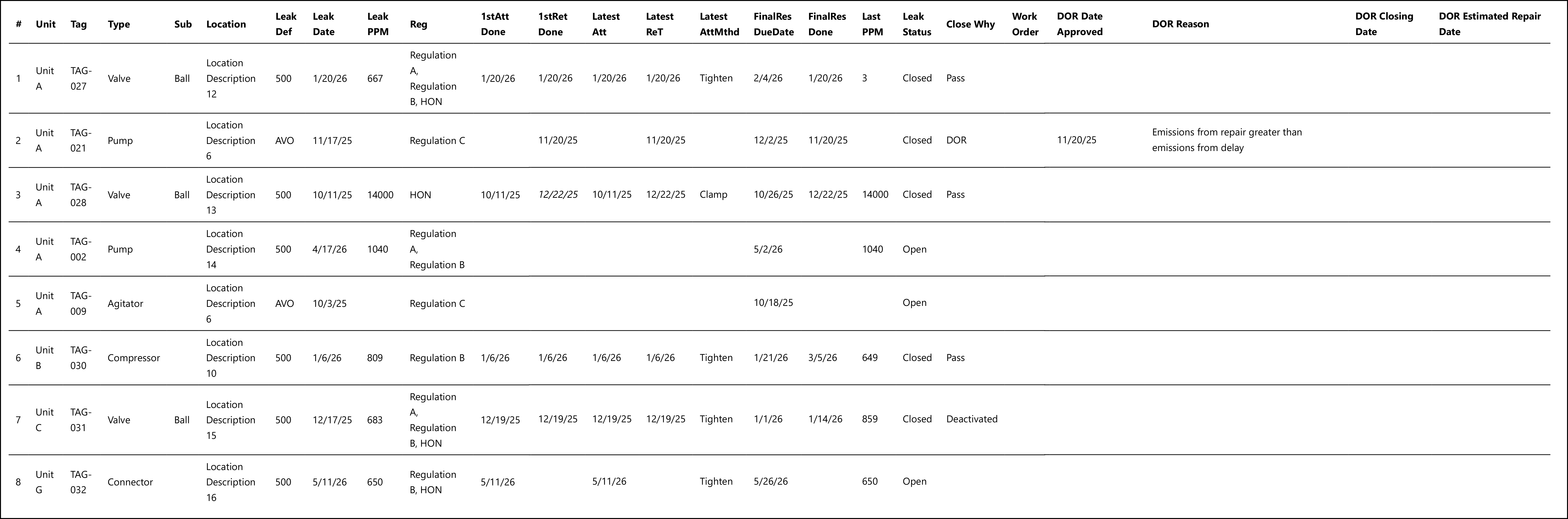
Italicized date in row 3 = underlined in the report (performed after the deadline).
What the rows illustrate:
- Row 1 (TAG-027) — Fully repaired M21 leak. All attempt/retest/resolution columns populated; Last PPM of 3 confirms the repair was successful.
- Row 2 (TAG-021 AVO) — AVO-detected leak with DOR. Leak Def and Leak PPM blank (no instrument reading); closed as DOR with DOR Date Approved and Reason populated.
- Row 3 (TAG-028) — Late first retest. The 1stRet Done date is underlined in the report — the retest missed its deadline. Last PPM matches the opening Leak PPM (14000 = 14000), confirming the leak was still present at retest.
- Row 4 (TAG-002) — Open leak, no attempts yet. All attempt/retest columns blank; FinalRes DueDate shows the upcoming deadline.
- Row 5 (TAG-009 Agitator) — Open AVO leak, no attempts. Leak PPM blank; FinalRes DueDate is the only deadline shown.
- Row 6 (TAG-030) — Repaired same day it was found. The attempt and retest columns all match the leak date (1/6/26); FinalRes Done is later (3/5/26) because final resolution is set when the verification inspection is confirmed passing, which may be processed after the repair date. Note that FinalRes Done (3/5/26) exceeds FinalRes DueDate (1/21/26) — this is a late resolution, not a data error.
- Row 7 (TAG-031) — Closed as Deactivated. A repair was attempted (Tighten), but the component was ultimately taken out of service; Last PPM still elevated at close.
- Row 8 (TAG-032) — Open leak with one attempt recorded but no retest yet. Latest Att and Latest AttMthd populated; 1stRet Done and Latest ReT blank.
Output format
Designed for Excel export. All columns appear in a single sheet in the order listed above, making it straightforward to filter, sort, and pivot the data. Dates that were completed after their deadline are underlined in the report viewer; this underline formatting is preserved when exporting to Excel. If you export to CSV, the underline formatting is not carried over — use the Excel export if you need the visual late-date indicators.
Related reports
- Full Data Leak History — same date-range/regulation filter structure but returns more columns including inspection-level detail; better for deep audit review.
- OGI Full Data Leak History — identical to Full Data Leak History but adds the target image and OGI inspection image columns for each leak.
- Simplified Maintenance — shows open leaks with a printable maintenance form; use this to hand to repair crews, not for historical compliance review.
- DOR Summary — dedicated report for DOR records; use when you need DOR-focused output rather than leak-history output with DOR columns appended.
- Agency DOR Summary — identical to DOR Summary but omits the emission point column; use when the agency does not require emission point detail in the submission.
- Leak Rate — summarizes leak percentage by unit and component type rather than showing individual leak records.