Full Data Leak History
Published: 2026-06-24 Revised: 2026-06-24
What this report does
Shows one section per component that had at least one leak within the selected date range. Each component section starts with a header block showing identity and physical properties, Delay of Repair (DOR) status, and current next action. Below the header, sub-sections show the individual leak records (with deadline and status rows) and a shared inspection and repair attempt table.
This report is designed for deep audit review of individual components — it gives a full picture of component attributes, leak history, and repair activity in a single view. This report is in the Leak folder on the Reports tab.
When to use it
- Conducting a component-level audit where you need physical properties (physical state, size, stream, CVS) alongside leak history.
- Reviewing DOR status and estimated repair dates for components with open leaks.
- Reviewing the full history of leaks on a component — open dates, deadlines, closure dates, and repair attempts — in a single printable record.
- Pre-inspection preparation when you need richer component context than Simplified Leak History provides.
Parameters
| Parameter | Description | Required | How it filters |
|---|---|---|---|
| Regulation | One or more regulations to include | Yes | Only components whose leaks are tied to the selected regulation(s) appear |
| Unit Type | Whether to filter by Process Unit or Location Unit | Yes | Defaults to Location Unit |
| Units | One or more units to include | Yes | Only components in the selected unit(s) appear |
| Comp Type | One or more component types to include | Yes | Only components of the selected type(s) appear |
| StartDate | Beginning of the date window | Yes | Components must have at least one leak with a found date on or after this date |
| EndDate | End of the date window | Yes | Defaults to today; includes leaks found through the end of this day |
Columns
Each component renders as a header block followed by sub-sections for each applicable leak type (M21 Leaks, AVO Leaks, OGI (Optical Gas Imaging) Leaks) and a shared inspection and attempt table. A sub-section only appears if the component has at least one leak of that type within the report window — if there are no OGI leaks, for example, the OGI Leaks sub-section is absent entirely. The header and sub-section columns are described separately below.
Component header
The header appears at the top of each component section and shows the following fields in a fixed layout:
| Field | What it shows | Format / Notes |
|---|---|---|
| Unit | The unit the component belongs to | Text |
| Tag | Component tag number | Text |
| Type | Component type, subtype, and sub-subtype displayed as a single comma-separated field | Text; e.g., "Pump, Centrifugal," or "Valve, Ball,"; trailing commas appear when subtype or sub-subtype are blank |
| Physical State (PHYS) | Physical state of the component | Text; e.g., "LL" (Light Liquid), "GV" (Gas Vapor), "HL" (Heavy Liquid) |
| Size | Component size | Decimal |
| Location | Location description | Text |
| Stream | Stream the component is on | Text; blank if not assigned |
| Area | Area the component is assigned to | Text; blank if not assigned |
| Subarea | Subarea within the area | Text; blank if not assigned |
| Monitoring Access Method (DTM How) | How the component is physically accessed for monitoring — the method used to bring an instrument to the potential leak point | Text; e.g., "Stem", "Horn", "Packing"; blank if not assigned |
| CVS | Whether the component is on a Closed Vent System | "Yes" or "No" |
| Isolatable | Whether the component can be isolated | Text; e.g., "Yes", "No"; blank if not assigned |
| Next Act (NEXT ACT) | Current next action on the component | Text; e.g., "Await Maint"; blank if none assigned |
| Profile | Current component profile | Text; full word — e.g., "Active", "Deactivated", "Taken Under Surveillance in Service" |
| TU Why (TUWHY) | Reason for a Taken-Under-Surveillance or TU-in-Process profile | Text; blank if profile is not TU-related |
| DOR Status | Action status of the most recent DOR whose approval date falls within the report window | Text; e.g., "Approved", "Pending"; blank if no qualifying DOR, or if the qualifying DOR's associated leaks have all been closed |
| DOR Auth By | Approver on the most recent in-window DOR | Text; blank if no qualifying DOR |
| Est Rep Date | Estimated repair date from the most recent in-window DOR | Date and time (e.g., 11/20/2025 6:00:00 AM); blank if no qualifying DOR |
M21 Leaks sub-section
One row per M21 leak, followed by a DateDue row (showing the regulatory deadline for each milestone) and a Status row (showing whether each deadline was met):
| Column | What it shows | Format / Notes |
|---|---|---|
| LeakDate | Date the M21 leak was opened | Date |
| Leak Def | PPM threshold that triggered the leak | Integer |
| Regs | Regulations the leak is assigned to | Text; comma-separated if more than one — e.g., "HRVOC, AWP, CFR-HON" |
| LkPpm | PPM reading from the inspection that opened the leak | Integer |
| Bkgd | Background PPM reading from the same inspection | Integer; 0 if none recorded |
| EmPt | Emission point | Text; e.g., "Bonnet", "Packing", "Seal"; blank if not recorded |
| 1stAtt Done | Date the first repair attempt was completed | Date; blank if not yet done |
| 1stReT Done | Date the first retest was completed | Date; blank if not yet done |
| FinalRes Done | Date final resolution was achieved | Date; blank if not yet resolved |
| CloseDate | Date the leak was closed | Date; blank if still open |
| CloseWhy | Reason the leak was closed | Text; e.g., "Pass", "DOR"; blank if still open |
The DateDue row shows the regulatory deadline for 1stAtt, 1stReT, and FinalRes. The Status row shows "PastDue" if the deadline passed without the milestone being completed, or "DoneLate" if the milestone was completed after the deadline; blank if done on time.
AVO Leaks sub-section
One row per AVO leak, followed by a DateDue row and a RespS row. The RespS row shows "PastDue" if the deadline passed without the milestone being completed, "DoneLate" if it was completed after the deadline, or blank if it was completed on time. (Same values as the M21 Status row; the label differs but the meaning is identical.)
| Column | What it shows | Format / Notes |
|---|---|---|
| LeakDate | Date the AVO leak was opened | Date |
| AVOType | Type of AVO observation | Text; e.g., "Visual", "Olfactory" |
| 1stAtt Done | Date the first repair attempt was completed | Date; blank if not yet done |
| 1stVerify Done | Date the first verification inspection was completed | Date; blank if not yet done |
| FinalRes Done | Date final resolution was achieved | Date; blank if not yet resolved |
| CloseDate | Date the leak was closed | Date; blank if still open |
| CloseWhy | Reason the leak was closed | Text; e.g., "Pass", "DOR"; blank if still open |
OGI Leaks sub-section
One row per OGI leak, followed by a DateDue row (showing the regulatory deadline for each milestone) and a RespS row (showing whether each deadline was met). The RespS row uses the same values as the AVO sub-section: "PastDue", "DoneLate", or blank if done on time.
| Column | What it shows | Format / Notes |
|---|---|---|
| LeakDate | Date the OGI leak was opened | Date |
| 1stAtt Done | Date the first repair attempt was completed | Date; blank if not yet done |
| 1stVerify Done | Date the first verification inspection was completed | Date; blank if not yet done |
| FinalRes Done | Date final resolution was achieved | Date; blank if not yet resolved |
| CloseDate | Date the leak was closed | Date; blank if still open |
| CloseWhy | Reason the leak was closed | Text; e.g., "Pass", "DOR"; blank if still open |
Inspection and attempt detail
A shared table below all leak sub-sections lists every inspection and repair attempt recorded for the component. Repair attempt rows show Att Date, AttType, AttMethod, and AttBy; inspection rows show InspDate, Insp Why, Tech, PPM, Analyzer, Result, AVOType, and InspComment. A row may show both attempt and inspection data when they occurred on the same date, or only one set when they did not.
| Column | What it shows | Format / Notes |
|---|---|---|
| Att Date | Date of the repair attempt | Date; blank if no attempt on this row |
| AttType | Type of repair attempt | Text; e.g., "Simple", "Advanced"; blank if no attempt |
| AttMethod | Repair method used | Text; e.g., "Tighten", "Tighten Seal", "Adjust Seal"; blank if no attempt |
| AttBy | Technician who performed the attempt | Text; blank if no attempt |
| AttComment | Notes on the repair attempt | Text; blank if none |
| InspDate | Date of the inspection | Date; blank if no inspection on this row |
| Insp Why | Reason for the inspection | Text; e.g., "Monthly", "Annual", "Quarterly", "Retest", "DOR" |
| Tech | Technician who performed the inspection | Text |
| PPM | PPM reading from the inspection | Integer; blank for AVO and OGI inspections |
| Analyzer | Analyzer used | Text; blank if not recorded |
| Result | Inspection result | Text; e.g., "Pass", "Fail" |
| AVOType | For AVO inspections: the type of observation | Text; blank for M21/OGI inspections |
| InspComment | Notes on the inspection | Text; blank if none |
What's included and excluded
Included:
- Only components that had at least one qualifying leak in the date range — components with no leaks do not appear.
- Leaks with a found date on or after StartDate and before midnight of the day after EndDate.
- Leaks tied to the selected regulation(s): for M21 and OGI leaks, the regulation is determined by the rule that opened the leak; for AVO leaks, the regulation comes from the selection made when the leak was entered.
- Leaks closed with reason "Component Mis-Identified" are excluded. This close reason means the component that was inspected was determined not to be the component it was believed to be — a labeling or identification error, not a data entry mistake.
- Cooling Tower inspections cannot be the inspection that opened a qualifying leak (but CT inspections may appear in the inspection and repair attempt table).
Excluded:
- Components outside the selected unit(s) or type(s).
- Components with no leaks in the date range.
- Leaks with close reason "Component Mis-Identified."
- Components that have not had a Physical State assigned will not appear — the Physical State join is required, not optional.
DOR column scope: The DOR columns (DOR Status, DOR Auth By, and Est Rep Date) reflect DORs whose approval date falls strictly between StartDate and EndDate (exclusive on both ends). A DOR approved exactly on the StartDate or exactly on the EndDate will not appear. A DOR that was approved before StartDate and is still open during your window will also not appear in these columns — even though it is an active DOR.
⚠ DOR visibility warning: If you are using this report to confirm DOR coverage for a period, be aware that DORs approved before your start date are invisible here regardless of whether they are currently open. Use the DOR Summary report to see all DORs that were open at any point during a period, including pre-existing ones.
How key values are calculated
CVS
The CVS column shows whether the component is on a Closed Vent System. "Yes" means it is; "No" means it is not.
Profile and TU Why
Profile shows the current component profile in full — e.g., "Active", "Deactivated", "Temporarily Unavailable - in Service". TU Why shows the change reason recorded on the most recent TU-related profile assignment; blank if the profile is not TU-related.
M21 Leaks DateDue and Status rows
The DateDue row under each M21 leak shows the regulatory deadline for the first attempt, first retest, and final resolution milestones. The Status row shows whether each deadline was met: "PastDue" if the deadline passed without the milestone completed, "DoneLate" if it was completed after the deadline, or blank if it was completed on time.
AVO Leaks DateDue and RespS rows
Same structure as M21. The label for the status row is "RespS" in AVO sub-sections (vs. "Status" in M21 sub-sections); the values — "PastDue" and "DoneLate" — are identical.
Regulation matching
For M21 and OGI leaks, the regulation is determined by the rule that opened the leak. For AVO leaks, the regulation comes from the selection made when the leak was entered. If neither path produces a match, a fallback lookup is used to ensure every qualifying leak is assigned to a regulation. A component row appears if any of its in-range leaks matches the selected regulation(s).
Tips and common questions
- "Why does this report look different from Simplified Leak History?" Full Data Leak History is component-centric (one summary row per component, with drill-down sub-sections for leaks). Simplified Leak History is leak-centric (one row per leak). Use Full Data for deep audit review of individual components; use Simplified Leak History for cross-regulation tabular exports.
- "The DOR columns are blank for a component I know is on DOR." The DOR columns only show DORs whose approval date falls strictly between StartDate and EndDate (exclusive). A DOR approved before StartDate — even if still open — will not populate these columns. DORs approved exactly on StartDate or EndDate are also excluded. Use the DOR Summary report to see all DORs that were active during a period, including ones approved before your window. DOR Summary uses a broader date window: any DOR that overlapped the period appears, even if it was approved before your start date.
- "A component appears but some sub-section rows are missing." The component header row appears whenever there is at least one qualifying leak. The detail sections (individual leak rows, inspections, attempts) may be empty if no matching records exist for that component.
- "What about OGI components?" Components with OGI leaks will have an OGI Leaks sub-section — see the Columns section above. To also see OGI target and inspection images alongside the data, use OGI Full Data Leak History instead.
- "The Status or RespS row is blank — is that an error?" A blank Status or RespS cell means either the milestone was completed on or before its deadline (done on time), or the deadline has not passed yet. It does not indicate missing data.
- "What does 'DoneLate' mean?" DoneLate means the milestone (first attempt, first retest, or final resolution) was completed, but after its regulatory deadline. The leak is not still open — it was resolved — but it missed the deadline window. This is different from "PastDue", which means the deadline passed without the milestone being completed at all.
- "Numbers in this report don't match what I see in Simplified Leak History." The two reports use different structures. Full Data Leak History is component-centric and groups all leaks under each component; Simplified Leak History is leak-centric and shows one row per leak. Component counts, DOR fields, and filtering behavior differ — see the article for each report for details before reconciling the two.
- "A leak I know was found is not showing." Leaks closed with a Mis-Identification reason are excluded from this report. If a technician found a reading above the leak definition threshold but it was later determined not to be a true leak (for example, background contamination or an instrument error), closing it as a misidentification removes it from leak history reports. Verify the leak closure reason if a known leak is missing.
- "My DOR counts don't match what I see in other reports." This report uses an exclusive date window for DOR inclusion — a DOR must have started before the end date AND ended after the start date (both boundaries are exclusive). Other reports may use inclusive boundaries. This difference can cause DOR counts to diverge slightly when DORs open or close exactly on the boundary dates.
Sample output
StartDate: 12/1/2023, EndDate: 2/8/2024, Unit Type: Location Unit, Units: Unit 1, Comp Type: VALVE.
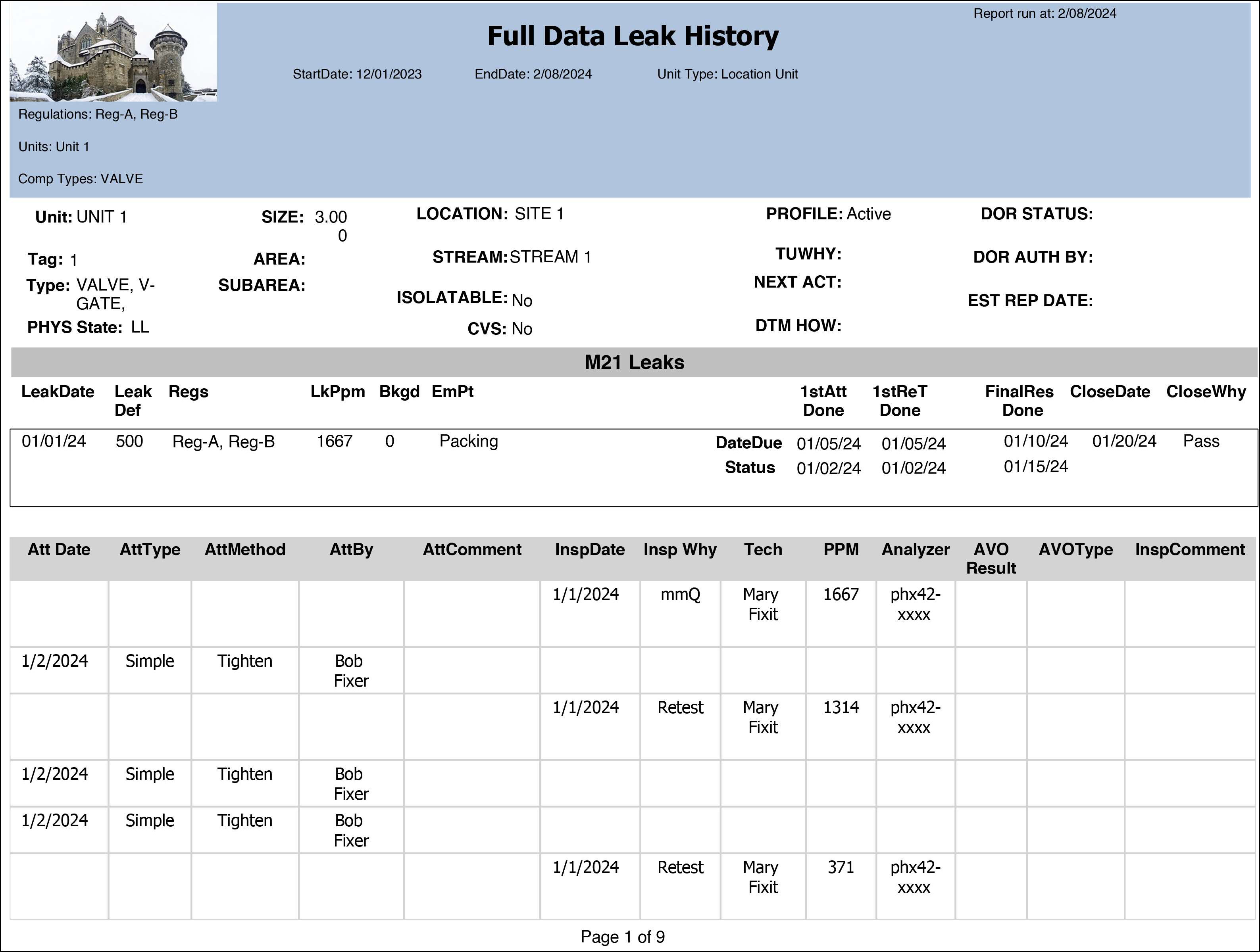
What the rows illustrate:
- Tag 1 (Unit 1, Valve V-Gate) — M21 leak opened 01/01/24 at 1667 PPM against a 500 PPM Leak Def, assigned to both Reg-A and Reg-B. EmPt = Packing. All milestones completed on time: 1stAtt Done and 1stReT Done both on 01/05/24 (DateDue 01/05/24), FinalRes Done 01/10/24 (DateDue 01/15/24), leak closed 01/20/24 with CloseWhy = Pass. Status row is blank, indicating no milestones were missed or late.
- Inspection and attempt detail — interleaved attempts and retests: The detail table shows the original mmQ inspection (1/1/2024, Mary Fixit, 1667 PPM) that opened the leak, followed by a repair attempt (1/2/2024, Simple, Tighten, Bob Fixer), then a Retest inspection (1/1/2024, Mary Fixit, 1314 PPM) still above threshold, then two more attempts (both 1/2/2024, Simple, Tighten, Bob Fixer), and a final Retest returning 371 PPM. The interleaved rows illustrate how attempt rows and inspection rows share the same table — rows with an Att Date contain repair attempt data; rows with an InspDate contain inspection data.
- DOR STATUS blank: No DOR was filed on this component — DOR Status, DOR Auth By, and Est Rep Date are all blank in the header, consistent with a leak that was repaired and closed without a DOR.
Related reports
- OGI Full Data Leak History — identical to this report but adds an OGI inspection image section for each component; use when visual OGI evidence is needed alongside the data.
- Simplified Leak History — leak-centric, multi-regulation export; use for cross-regulation tabular summaries rather than per-component audit detail.
- DOR Summary — DOR-focused report; use when you need DOR records without the component property columns.
Output format
Designed for on-screen viewing and printing. The component-level header rows and detail sub-sections are best reviewed in the report viewer. Export to Excel or CSV will flatten the sub-sections; the result is usable but less readable than the rendered layout.