DOR Summary
Published: 2026-06-24 Revised: 2026-06-24
What this report does
Lists every Delay of Repair (DOR) that was open at any point during the selected date range for the selected regulation. Each row represents one DOR on one component, showing the component's identity, the DOR approval and closure dates, and all emission points from any leaks that were open on the component at the time the DOR was approved.
Use this report when you need a consolidated view of DOR activity — who approved each DOR, why it was filed, when it was closed, and which emission points were associated with the underlying leak. This report is in the Leak folder on the Reports tab.
When to use it
- Reviewing outstanding or recently closed DORs before or after a regulatory inspection.
- Reconciling DOR counts with regulatory submissions for a specific regulation and time period.
- Looking up the emission points linked to each DOR without opening individual component records.
- Auditing DOR close reasons across a unit or set of component types.
Parameters
| Parameter | Description | Required | How it filters |
|---|---|---|---|
| Regulation | The regulation to report on | Yes | Only DORs whose regulation assignment overlaps the date range for this regulation are included |
| Unit Type | Whether to filter by Process Unit or Location Unit | Yes | Determines which Unit list populates; defaults to Location Unit (note: Agency DOR Summary defaults to Process Unit — match this setting when comparing both reports side-by-side) |
| Units | One or more units to include | Yes | Only components in the selected unit(s) appear |
| Comp Types | One or more component types to include | Yes | Only components of the selected type(s) appear |
| Start Date | Beginning of the date window | Yes | DORs closed entirely before this date are excluded — use together with End Date to define the window |
| End Date | End of the date window | Yes | DORs approved on or before this date are candidates; DORs closed before the Start Date are excluded |
Note on Regulation: This parameter accepts a single value, not a multi-select list.
Columns
| Column | What it shows | Format / Notes |
|---|---|---|
| Unit | The unit the component belongs to | Text; rows are grouped by unit |
| Regulation | The regulation the DOR is associated with | Text; the regulation code from the DOR's regulation assignment |
| Tag | Component tag number | Text |
| Type | Component type (e.g., Valve, Pump, Connector) | Text |
| Location Description | Component location | Text |
| DOR Approver | Name of the person who approved the DOR | Text |
| DOR Why | Reason the DOR was filed | Text; values are site-configurable; common defaults include "Parts not available", "Technically Infeasible without a process unit SD", "Emissions from repair greater than emissions from delay", "Isolated from VOC Service", "Isolated from VHAP Service"; sites may add custom reasons |
| DOR Comment | Free-text memo entered when the DOR was created | Text; blank if no comment was entered |
| EmPoint | Emission points from all leaks that were open on the component at the time the DOR was approved — this may include multiple concurrent leaks | Comma-separated list (e.g., "Bonnet,Packing,Seal"); blank if no emission points were recorded on any of those leaks; if two concurrent leaks share the same emission point code, that code may appear more than once in the list |
| Initial Leak Date | The earliest open date among all leaks that were open on the component at the time the DOR was approved. If only one leak was open, this is that leak's detection date; if multiple leaks were open simultaneously, this shows the earliest of those dates | Date; displayed in the component's local facility time zone (converted from UTC); note: the column header in the report reads "Initial LeakDate" (no space) |
| Date Opened | Date the DOR was approved — this is the date the DOR period officially begins | Date; component local time |
| Est Repair Date | Estimated repair date filed with the DOR | Date; component local time; blank if no estimated repair date was entered |
| Date Closed | Date the DOR was closed | Date; blank if the DOR is still open |
| DOR Close Why | Reason the DOR was closed | Text; values are site-configurable; common values include "Passed" (component tested below the leak definition after repair), "New Equipment" (component replaced), "DeActivated" (component removed from service), "DOR Stopleak" (leak stopped without formal repair); blank if still open |
What's included and excluded
Included:
- DORs whose approval date falls on or before the End Date AND whose closing date (if any) is after the Start Date. A DOR that was open at any point within the window is included.
- Only DORs tied to the selected regulation via the regulation's historical assignment record.
- Only components in the selected unit(s) and component type(s) with a tag number assigned.
Excluded:
- DORs that were closed before the Start Date — these were fully resolved before the window.
- DORs on components outside the selected unit(s) or component type(s).
- Components with no tag number recorded are excluded.
- Leaks opened by a Cooling Tower inspection are excluded from the qualifying leaks that make a component eligible to appear in this report.
How key values are calculated
Date window for DOR inclusion
A DOR is included when it was approved on or before the End Date AND was not closed before the Start Date. A DOR that was open at any point during the window — even if only for one day — is included. A DOR fully closed before the Start Date is excluded.
Emission Point (EmPoint)
The EmPoint column lists all emission point codes from leaks that were open on the component at the moment the DOR was approved. If multiple leaks were concurrently open, emission points from all of them are combined into a comma-separated list. If no emission points were recorded on any of those leaks, this column is blank.
DOR regulation matching
The DOR is matched to the selected regulation using the regulation's historical assignment record. A DOR is eligible if its regulation assignment was active at any point during the report's date range — including DORs whose regulation assignment ended partway through the window. If a component's regulation was changed during the selected period, DORs from before the change may still appear in the results.
Dates and local time
All date columns display in the component's local time (converted from UTC). The time zone is determined by the component's facility.
Tips and common questions
- "A DOR I expected to see is missing." Check whether the DOR's regulation matches the selected Regulation parameter — one DOR can only be matched to one regulation at a time. Also verify the component's unit and type are selected.
- "What's the difference between DOR Summary and Agency DOR Summary?" DOR Summary adds an EmPoint column showing emission points from all leaks open at the time the DOR was approved. Agency DOR Summary omits that column. DOR Summary also defaults the Unit Type filter to Location Unit; Agency DOR Summary defaults to Process Unit. Both reports pull from the same data source.
- "The EmPoint column is blank for some rows." EmPoint is populated from emission points recorded on any leak that was open on the component when the DOR was approved. If no emission points were entered on any of those leaks, the column is blank — this is common for AVO (Audio, Visual, and Olfactory) leaks or components where emission point data is not tracked.
- "How do I find only currently open DORs?" Filter the exported data in Excel to rows where the Date Closed column is blank after exporting, or use the DOR-focused views in Chateau instead of this report.
- "A regulation I expected isn't in the filter list." The Regulation parameter is a single-select dropdown populated from the regulations configured in your Chateau site. Contact your Chateau administrator if a regulation you expect to see is missing.
- "A component with a Cooling Tower leak doesn't appear." Leaks opened by a Cooling Tower inspection are excluded from the qualifying leaks that trigger DOR eligibility in this report. If a DOR was filed on a component whose only qualifying leak was a Cooling Tower leak, that DOR will not appear.
- "The DOR Why or DOR Close Why values on my printout don't match my site's options." The available values for both fields are configured in the Picklists section of Chateau. Contact your Chateau administrator to view, add, or modify the options available at your site.
- "The EmPoint column shows duplicate values for some components." When a component has more than one concurrent open leak, all associated emission points are included in the EmPoint field — which can produce repeated emission point codes for the same component. This is expected behavior when a component has multiple active leaks at the same time.
- "What is an emission point?" An emission point is a classification assigned to a component that identifies where emissions may originate in the process. Components are assigned to emission points as part of their regulatory setup. A component can be associated with more than one emission point when it falls under multiple classifications or regulations.
Related reports
- Agency DOR Summary — identical data source, same layout, but omits the EmPoint column; often used for regulatory submissions where emission point detail is not required.
- Simplified Leak History — leak-centric report that appends DOR columns to each leak row; use when you want DOR context alongside full leak timeline data.
- Full Data Leak History — component-centric report that includes a DOR approver and estimated repair date column; suited for audit review of component-level DOR state.
Sample output
Five representative rows showing common scenarios.
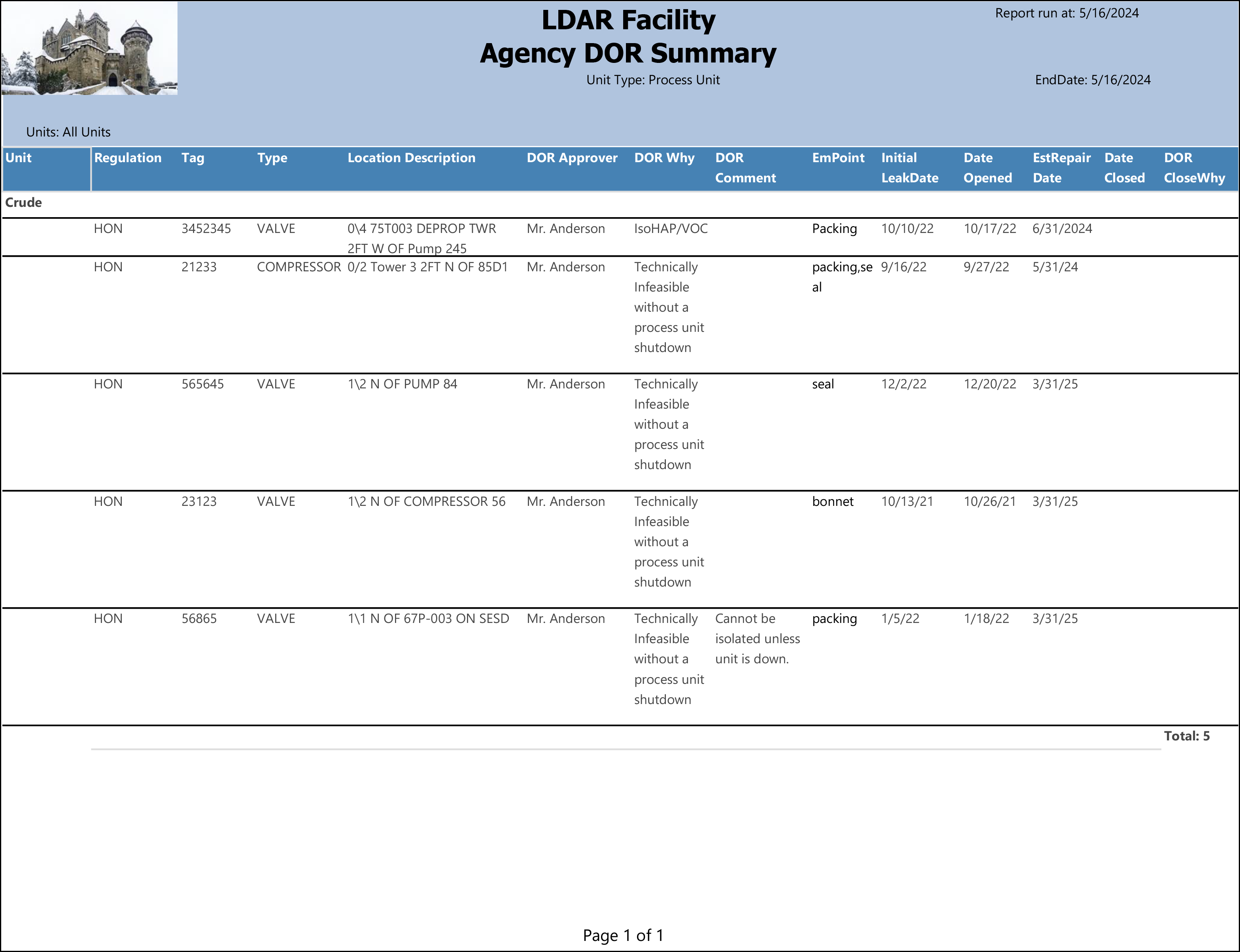
What the rows illustrate:
- Tag 3452345 (Valve) — Open DOR filed under "IsoHAP/VOC" with EmPoint = Packing. Date Closed is blank, indicating the DOR was still open at the time of the report run.
- Tag 21233 (Compressor) — The only non-Valve component in the sample. EmPoint = "packing,seal", showing two emission points from the leak open at the time of DOR approval. DOR filed under "Technically Infeasible without a process unit shutdown"; still open.
- Tag 565645 (Valve) — "Technically Infeasible" DOR with EmPoint = seal. Initial Leak Date of 12/2/22 and Date Opened of 12/20/22, an 18-day gap between leak detection and DOR approval. Still open with an estimated repair date of 3/31/25.
- Tag 23123 (Valve) — Long-running open DOR with an Initial Leak Date of 10/13/21 and Date Opened of 10/26/21, illustrating that a DOR can span multiple years under a "Technically Infeasible" justification. EmPoint = bonnet.
- Tag 56865 (Valve) — "Technically Infeasible" DOR with a DOR Comment entered: "Cannot be isolated unless unit is down." EmPoint = packing. This is the only row in the sample with a comment, illustrating the optional free-text memo field.
Output format
Suitable for both on-screen review and PDF export. Rows are grouped by unit with a count of components at the end of each group. The report header shows the regulation, date range, unit type, and selected units.