MMQ Compliance
Published: 2026-06-23 Revised: 2026-06-23
What this report does
Tracks the inspection history of components that entered the MMQ (Monthly/Monthly/Quarterly) monitoring program during the target month or the month immediately before it. The report has three sections:
- Activated Components — valves that became active during the two-month window and their subsequent inspections.
- Newly Installed Equipment — valves installed during the two-month window and their subsequent inspections.
- Leaks — components in the selected units that had a leak during the two-month window, along with all inspections performed on those components during the window.
Use this report to verify that newly activated components and newly installed equipment received the required MMQ inspections, and that leak-triggered re-inspections were completed on schedule. This report is in the Compliance folder on the Reports tab.
When to use it
- Confirming that components activated or installed in the prior or current month were inspected within the MMQ program's required timeframes.
- Reviewing which components with leaks received follow-up (re-test) inspections.
- Producing an MMQ compliance record for an audit or regulatory review.
Parameters
| Parameter | Description | Required | How it filters |
|---|---|---|---|
| Target Date | Any date within the target month | Yes | Defines the target month; the report covers that month plus the previous calendar month |
| Unit Type | Whether to filter by Process Unit or Location Unit | Yes | Determines the unit hierarchy used for the Units parameter |
| Units | One or more units to include | Yes | Only components in the selected units appear |
Two-month window. The report always covers a two-month window: the full calendar month before the Target Date's month, plus the full calendar month of the Target Date.
Sections and columns
Activated Components
Inspection history for all valves activated in the target month and previous month.
| Column | What it shows |
|---|---|
| Unit | Location or Process Unit |
| Tag Number | Component tag |
| Type | Component type (e.g., "Valve") |
| Sub Type | Component sub-type (e.g., "Ball") |
| Date Active | Date the component's active profile began |
| Inspection Why | Inspection reason code for each inspection in the window |
| Date | Date of the inspection |
| Ending MMQ Phase | The MMQ phase the component was in at the time of the inspection |
Newly Installed Equipment
Inspection history for all valves with a recorded installation date in the target month and previous month.
| Column | What it shows |
|---|---|
| Unit | Location or Process Unit |
| Tag Number | Component tag |
| Type | Component type |
| Sub Type | Component sub-type |
| Date Installed | Date the equipment was installed |
| Inspection Why | Inspection reason code |
| Date | Date of the inspection |
| Ending MMQ Phase | The MMQ phase at the time of the inspection |
Leaks
Inspection history for all components with a leak detected in the target month and previous month.
| Column | What it shows |
|---|---|
| Unit | Location or Process Unit |
| Tag Number | Component tag |
| Type | Component type |
| Sub Type | Component sub-type |
| Leak Date | Date the leak was detected (blank for re-inspection rows with no new leak) |
| Inspection Why | Inspection reason code (e.g., "M", "W", "ReT") |
| Date | Date of the inspection |
| Ending MMQ Phase | The MMQ phase at the time of the inspection |
What's included and excluded
Included:
- Valves only (Type = Valve).
- Components in the selected units under the selected unit type.
- Activated components: valves whose active profile began during the two-month window (excluding components with a prior Temporarily Unavailable profile).
- Newly installed equipment: valves with an equipment installation date falling in the two-month window.
- Leaked components: valves with any inspection linked to a leak during the two-month window; all inspections on those components during the window are shown (including re-inspections that have no new leak).
Excluded:
- Non-valve component types.
- Components outside the selected units.
- Activated components with a prior Temporarily Unavailable (TU) profile are excluded from the Activated Components section.
How key values are calculated
Target Month and two-month window
The Target Date determines the target month. The report window is:
Window start = first day of the month before the Target Date's month Window end = last day of the Target Date's month
For example, a Target Date of 12/4/2025 produces a window of 11/1/2025 through 12/31/2025.
Ending MMQ Phase
The MMQ phase shown for each inspection row reflects the phase the component was in at the time of that inspection. Common phase codes include M1 (first monthly), M2x (second monthly extended), mmQ (monthly/quarterly transition), and Q (quarterly).
Leak Date
In the Leaks section, Leak Date is the date the leak was opened. For re-inspection rows where no new leak was recorded, Leak Date is blank — the row represents a follow-up inspection on a component that already had an open leak.
Tips and common questions
- "A component I expected to see is missing from Activated Components." The report only includes valves. Also, components with a prior Temporarily Unavailable (TU) profile are excluded from the Activated Components section — those represent components that were previously out of service.
- "A row in the Leaks section has a blank Leak Date." This is a re-inspection row. The component had an open leak from an earlier inspection in the window; this row represents a follow-up or re-test inspection, not the initial detection event.
- "The same component appears multiple times." Multiple rows appear when a component had more than one inspection during the two-month window (e.g., initial detection plus one or more re-inspections).
- "Unit Type: what is the difference between Process Unit and Location Unit?" Process Units are higher-level groupings in your facility hierarchy; Location Units are the individual operating areas. Choose the unit type that matches how you want to filter and how your facility's units are organized.
- "Why does the report use two months instead of one?" The MMQ program requires re-inspection within the calendar month after activation or leak detection. Using a two-month window ensures components activated or discovered at the end of the prior month still appear with their required follow-up inspections.
Sample output
Report run for Target Date: 12/4/2025, Unit Type: Location Unit, Units: All Units.
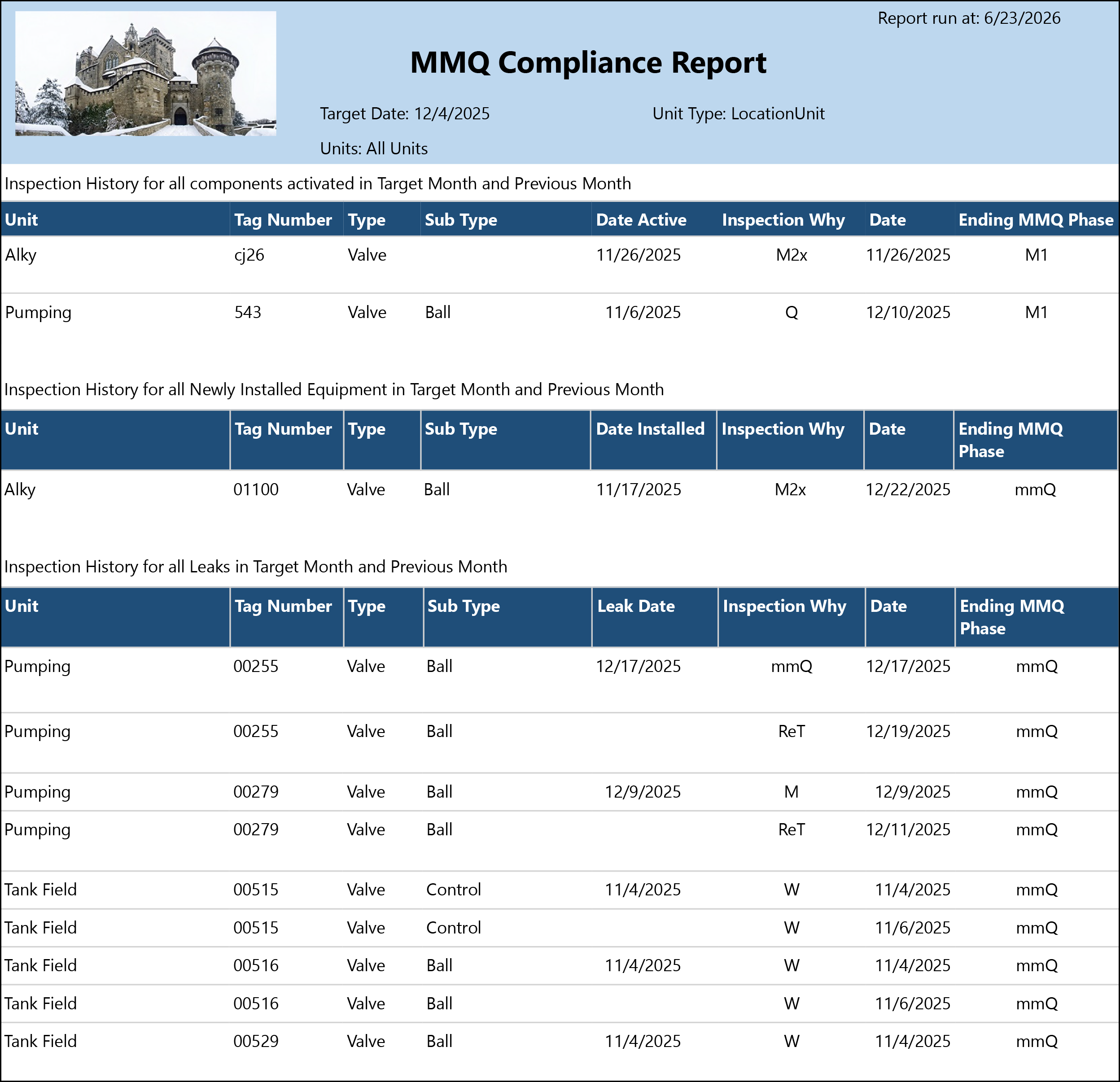
What the rows illustrate:
- Activated Components — cj26 (Alky): Activated 11/26/2025 and inspected the same day under M2x reason code, ending in phase M1.
- Activated Components — 543 (Pumping): Activated 11/6/2025 and inspected on 12/10/2025 under Q reason code, ending in phase M1. The inspection fell in the second month of the window.
- Newly Installed Equipment — 01100 (Alky): Installed 11/17/2025 and inspected 12/22/2025 under M2x reason code, ending in phase mmQ. Leaks — 00255 (Pumping): Leak detected 12/17/2025; re-tested (ReT) on 12/19/2025. The second row has a blank Leak Date, confirming it is a re-inspection rather than a new detection event. Both rows end in phase mmQ.
- Leaks — 00279 (Pumping): Leak detected 12/9/2025 under M reason code; re-tested (ReT) on 12/11/2025. Both rows end in phase mmQ.
- Leaks — 00515 and 00516 (Tank Field): Each tag has two W reason code rows — an initial inspection on 11/4/2025 and a follow-up on 11/6/2025. Leak Date is blank on the second row of each pair, confirming it is a follow-up inspection. 00515 is a Control valve subtype; 00516 is a Ball valve.
- Leaks — 00529 (Tank Field): Ball valve with a W inspection on 11/4/2025 in phase mmQ.
Output format
Three-section report: one table per section (Activated Components, Newly Installed Equipment, Leaks). Each section lists rows ordered by unit, tag, and date. Suitable for on-screen viewing, PDF, and Excel export.
Related reports
- Periodic Inspection Summary — monthly inspection, leak, and DOR counts by component expression for a unit.
- Component Count Change — component count changes by unit under a regulation.