Daily Calibration
Published: 2026-06-18 Revised: 2026-06-18
What this report does
Lists every daily calibration reading for each selected analyzer within the date range. Each row is one gas cylinder result from a calibration session — showing the analyzer, date, technician, calibration and confirmation times, cylinder, concentration, analyzer reading, percent difference, and whether the reading passed.
Use this report to verify that calibrations were performed, review readings and pass/fail results, and confirm cylinder and probe information for each calibration session. This report is in the Calibration folder on the Reports tab.
When to use it
- Verifying that all analyzers had daily calibrations performed within a period.
- Reviewing calibration pass/fail results for a specific analyzer or date.
- Confirming cylinder serial numbers and expiration dates used during calibrations.
- Producing a calibration record for an audit or regulatory submission.
Parameters
| Parameter | Description | Required | How it filters |
|---|---|---|---|
| Start Date | Start of date window | Yes | Calibrations on or after this date are included |
| End Date | End of date window | Yes | Calibrations on or before this date are included |
| Analyzers | One or more analyzers to include | Yes | Only calibration records for the selected analyzers appear |
Analyzer list is date-filtered. The Analyzers parameter only shows analyzers that have a calibration record in the database for the selected date range.
Columns
| Column | What it shows | Format / Notes |
|---|---|---|
| Analyzer | Analyzer device name | Text; e.g., "phx42-1550" |
| Date | Date the calibration was performed | Date; displayed in facility local time |
| Tech Id | Name of the technician who performed the calibration | Text |
| Calibrate | Time the calibration reading began | Time (H:MM:SS AM/PM) |
| Confirmed | Time the calibration reading was confirmed (end time) | Time (H:MM:SS AM/PM) |
| Cylinder | Cylinder label or serial number | Text; the custom label assigned to the cylinder |
| Cyl. Exp. | Cylinder expiration date | Date |
| Probe Type | Probe type used | Text; "Standard" or "Extension" |
| Conc. | Cylinder gas concentration in PPM | Decimal |
| Reading | Analyzer reading in PPM | Decimal |
| Diff. | Percent difference between the reading and concentration | Percentage; see calculation below |
| Pass | Whether the calibration reading passed | "Yes" or "No" |
| Warmup | Time the analyzer was warming up before calibration | Duration in minutes (e.g., "16 min"); blank if no warmup recorded |
What's included and excluded
Included:
- All daily calibration readings for the selected analyzers within the date range.
- One row per gas cylinder per calibration session.
Excluded:
- Analyzers not selected.
- Calibration records outside the date range.
- Precision Calibration records (those appear in the Precision Calibration report).
- Drift check records (those appear in Analyzer Drift or VVa Drift reports).
How key values are calculated
Diff.
For span gas cylinders:
Diff. = 100 − (Reading ÷ Concentration × 100)
A reading equal to the cylinder concentration produces a Diff. of 0%. A reading below concentration produces a positive Diff.; above produces a negative Diff.
For zero gas cylinders (0 PPM target):
Diff. = Reading × 10
Zero gas readings are near zero PPM; the × 10 factor scales small deviations to a visible percentage.
Warmup
The number of minutes from when the analyzer was powered on (warm-up start) to when the calibration session began.
Tips and common questions
- "Analyzer is not showing in the list." The Analyzer parameter only populates analyzers that have calibration records in the database for the selected date range. If an analyzer is missing, confirm that calibration data was uploaded for it.
- "Some rows show Pass = No." A failed calibration means the reading fell outside the acceptable tolerance for that cylinder. The Diff. column shows how far the reading was from the cylinder concentration.
- "Warmup is blank for some rows." If the analyzer's warm-up start time was not recorded (older records or certain analyzer models), the Warmup column will be blank.
- "There are multiple rows per analyzer per date." Each calibration session spans multiple gas cylinders. Each cylinder produces one row. A typical calibration session might include a zero gas and two or three span gases.
- "How is this different from Daily Calibration – Form 2?" This report shows a Confirmation Time (when the reading ended) and a Warmup duration. Daily Calibration – Form 2 instead shows the Probe Flow rate and the Warm-Up start time.
Sample output
Report run for Example Facility, Start Date: 1/30/2023, End Date: 1/30/2023, Analyzer: phx42-1934.
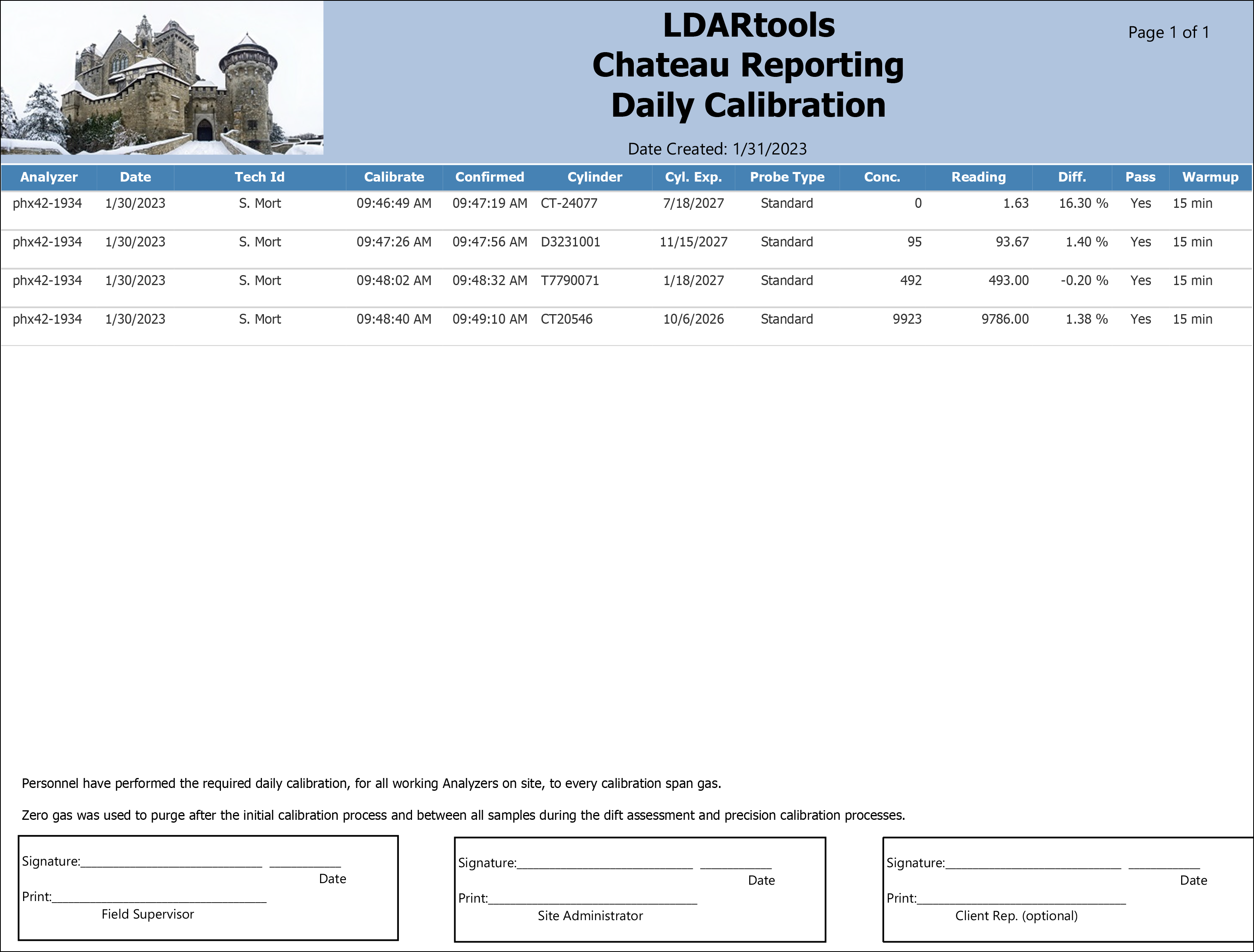
What the rows illustrate:
- phx42-1934 (CT-24077, Zero gas) — Zero gas calibration; Conc. = 0, Reading = 1.63, Diff. = 1.63%.
- phx42-1934 (CT20546) — Span gas at 9,923 PPM; reading over 1% of concentration.
Output format
One row per gas cylinder per calibration session, ordered by date, analyzer, and cylinder concentration. Suitable for on-screen viewing, PDF, and Excel export.
Related reports
- Daily Calibration – Form 2 — same calibration data with Probe Flow and Warm-Up start time instead of Confirmation Time.
- Daily Cal with Maintenance Checklist — same calibration data with an additional analyzer self-check diagnostic section appended.
- Analyzer Drift — drift check readings taken during the day, tied to the same calibration session.
- VVa Drift — drift checks performed using the VVa method.
- Precision Calibration — response time and precision measurements for each analyzer.