InspectionWhy (M21 or AVO)
Published: 2022-05-09 Revised: 2025-07-23
| Type of "Why" (M21 or AVO) | Example |
|---|---|
| Frequency | W, M, Q, S, A |
| Phase of the MMQ Cycle | M1, M2, mmq |
| Special Circumstances | ReT, DOR, DTM, fDTM |
Chateau assigns a label to every scheduled or performed inspection defining why the inspection will be or was performed.
If the Inspection is an M21 inspection, the Why is prefaced with M21. If the Inspection is an AVO inspection, then the Why is prefaced with AVO.
M21 and AVO inspections are separate. No Inspection can be both types.
You will find the InspectionWhy in the following places:
- Component grid
- Tours grids
- Inspection grid
- Inspection Record for each Inspection
- In Chateau Mobile
- Various Reports
You MUST use the Inspection Why label to request a special inspection.
For instance, if you want to monitor a recently released PRV, you can order an M21 inspection with the label PRVR (PRVRelease). Having this attached to the schedule, displayed in Tours, showing in the handheld, and then affixed to the actual inspection creates a valuable level of transparency.
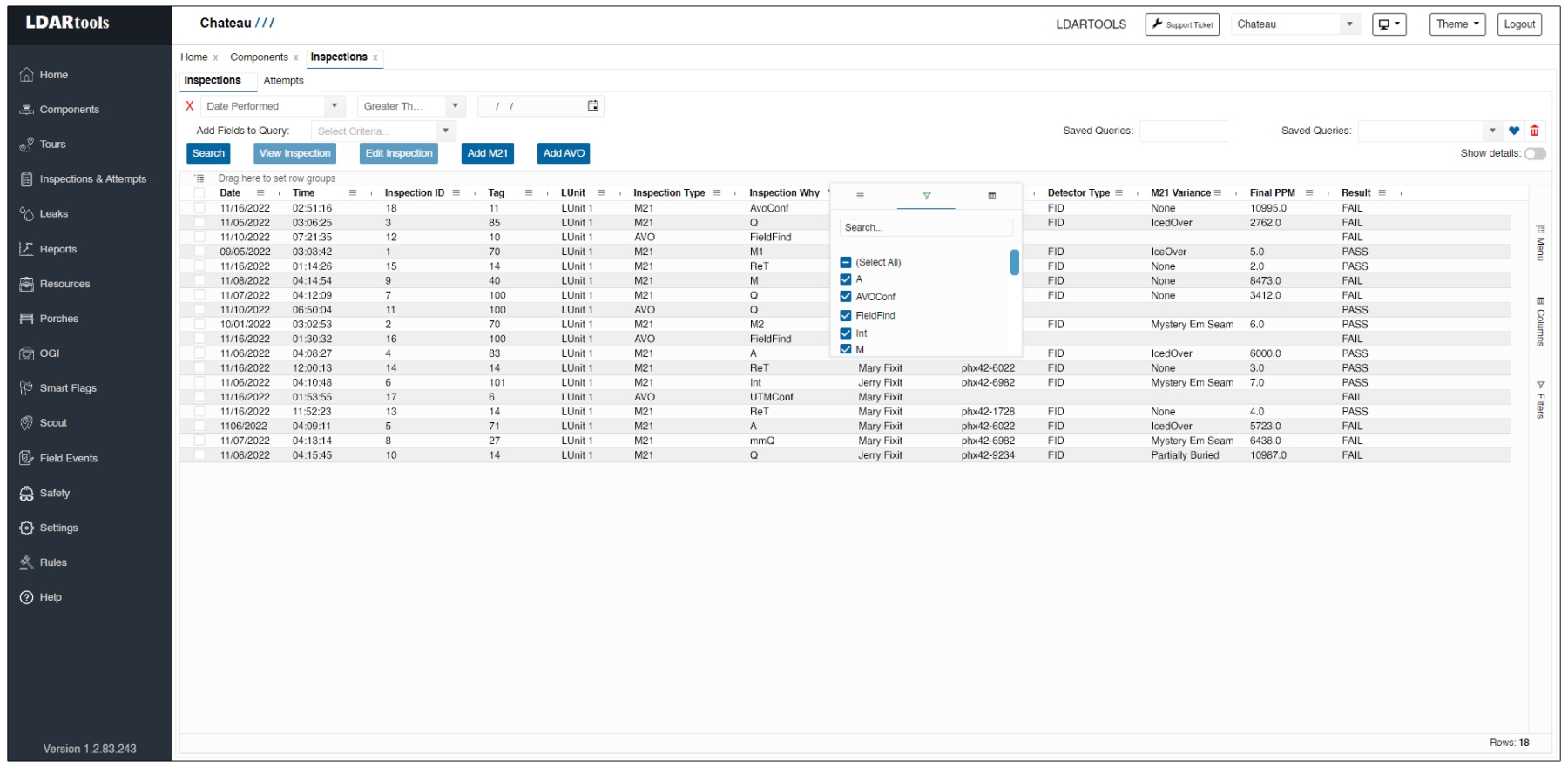
Some M21 Events satisfy other M21 Events. Others do not. The following tables provide more details.
Any of these Standard M21Why can satisfy any other Standard M21Why.
| InspectionWhy | Inspection Type | Definition |
|---|---|---|
| After ReAct | M21 | Inspection performed because a component has been ReActivated. |
| Annual | M21 | Required by regulation to be performed at this frequency. |
| AVOConf | M21 | Confirm PPM on suspect AVO. |
| CmpMonAudit | M21 | Comparative Monitoring Audit. Inspection performed by the Auditor. |
| CmpMonConf | M21 | Inspection performed to confirm the inspection was performed by an auditor. |
| ConfirmPurge | M21 | Inspection to confirm a component is actually purged. |
| ConfirmWeld | M21 | Inspection to confirm that a component is properly welded. |
| CVSMaintenance | M21 | Inspection performed as a result of maintenance on a CVS. |
| D30 | M21 | Monitoring required within 30 days after the leak was repaired. |
| D90 | M21 | Monitoring required within 90 days after the leak was repaired. |
| Daily (D) | M21 | Everyday. |
| DistInspAudit | M21 | Inspection performed during a District Audit in California. |
| DistInspectConf | M21 | Inspection taken immediately after the DistInspAudit, above, to confirm or correct the inspection taken by the District Auditor. |
| DOR | M21 | Delay-of-Repair. |
| Drift Fail High ReCheck | M21 | Inspection performed on an existing "leak" after an analyzer has failed a drift assessment to confirm the component is really leaking. |
| Drift Fail Low ReCheck | M21 | Inspection performed on an existing "leak" after an analyzer has failed a drift assessment to confirm the component is really leaking. |
| DTM | M21 | Difficult-to-Monitor components. |
| fDTM | M21 | Frequency DTM: A DTM marked to enable Chateau to schedule it according to its normal frequency rather than annually. |
| Initial | M21 | Initial monitoring requirement, regulation, or rule. |
| Late | M21 | Monitor Late. |
| Legacy | M21 | Inspection imported from a non-Chateau database. |
| m1 | M21 | First month on MMQ cycle after a component has previously been in the mmQ phase and had its MMQ phase reset due to a leak or newly installed equipment. |
| m2 | M21 | Second month on MMQ cycle after a component has previously been in the mmQ phase and had its MMQ phase reset due to a leak or newly installed equipment. |
| M1 | M21 | First month on MMQ cycle when initially qualifying for mmQ phase. |
| M2 | M21 | Second month on MMQ cycle when initially qualifying for mmQ phase. |
| MaintReq | M21 | An inspection specially Requested by Maintenance. |
| mmQ | M21 | The quarterly event occurring after a passing result on an M2 Inspection. |
| Monthly (M) | M21 | Required by regulation to be performed at this frequency. |
| New | M21 | The label attached to any inspection occurring before a Rule is run on a component, such as when a tech documents and monitors a component in Chateau Mobile before Chateau runs the rules on that new component. |
| NonCovRpt | M21 | NonCovered Comp PPM is Reportable. |
| NonCovVol | M21 | NonCovered Comp PPM is Not Reportable. |
| OEL Confirmation | M21 | Inspection on an Open Ended Line to determine if there is a VOC leak. |
| OGI Conf | M21 | Confirm an OGI result. |
| Open Flange | M21 | Monitor on an Open Flange recently opened to confirm it is properly closed. |
| Open Seal | M21 | Monitor on an Open Seal recently opened to confirm it is properly closed. |
| Open Threads | M21 | Monitor on an Open Thread recently opened to confirm it is properly closed. |
| PRV Delay | M21 | Delayed PRV Release check. |
| PRV Release | M21 | Primary PRV Release check. |
| Quarterly (Q) | M21 | Required by regulation to be performed at this frequency. |
| Random | M21 | Inspection done on a Random group of connectors. |
| SemiAnnual (S) | M21 | Required by regulation to be performed at this frequency. |
| Survey | M21 | Inspection performed someone wants for some special purpose. |
| UTM Now | M21 | Inspection performed on a UTM component safe to Monitor "now." |
| Vol Reportable | M21 | Voluntarily Reportable. |
| Weekly (W) | M21 | Required by regulation to be performed at this frequency. The weekly frequency starts the week on Sunday, ending on Saturday. |
These non-reportable events DO NOT satisfy any other monitoring requirements.
| InspectionWhy | Inspection Type | Definition |
|---|---|---|
| DORTrial | M21 | This special DOR ReTest does not create a leak if the PPM reading is above the leak definition. It is a trail inspection allowed under some regulations. |
| Vol NonReportable | M21 | Voluntarily NON Reportable |
These are the AVO-Specific Events:
- Field Find
- UTMConfirm
- AVOReTest (DOES NOT satisfy any other monitoring requirements)
- Plus Frequency Whys
- Barrier Failure
- Investigation
- Quality Control
- Requested
- Sensor Failure
These are the OGI-Specific Events:
- Failed Picture Audit
- OGI Retest
- Plus Frequency Whys
These M21Whys (when required) can only be satisfied by themselves. They also DO NOT satisfy any other monitoring requirements.
| Term | Type | Definition |
|---|---|---|
| DORDelayedReT | M21 | For a ReTest on a DOR that is delayed after its Day 15 requirement. |
| DORReT | M21 | ReTest done on an component that is on DOR status. |
| ReTest | M21 | ReTest on leakers. |
External M21Why
Inspections imported from previous databases will have an external InspectionWhy.
What does a blank NextM21Why mean?
If the NextM21Why is blank, this indicates monitoring is done for the current period.
Managing Inspection Whys
You can control which Inspection Whys appear when manually adding an inspection. Go to Settings > Picklists and select the Inspection Whys category. For each inspection type, choose which whys are available in the manual inspection picker. You can also add custom whys for special inspections you order outside of Chateau's rule-driven scheduling.